
Codex + Unreal MCP: A Complete Workflow Breakdown—Building a Total War–Style Three Kingdoms Tactics Game in One Week with AI
Building a game with Codex and the MCP interface in Unreal Engine 5.8 has moved beyond a demonstration of whether it is possible and become a reproducible engineering pipeline. Based on Epic’s official documentation and actual tool-call logs, this article fully breaks down this AI game development pipeline: What capabilities does Unreal MCP expose? What actions does the agent actually perform in the editor? How can AI replace the modeling work in the 3D asset phase? And what are the nine connection pitfalls most likely to block you at the first step?
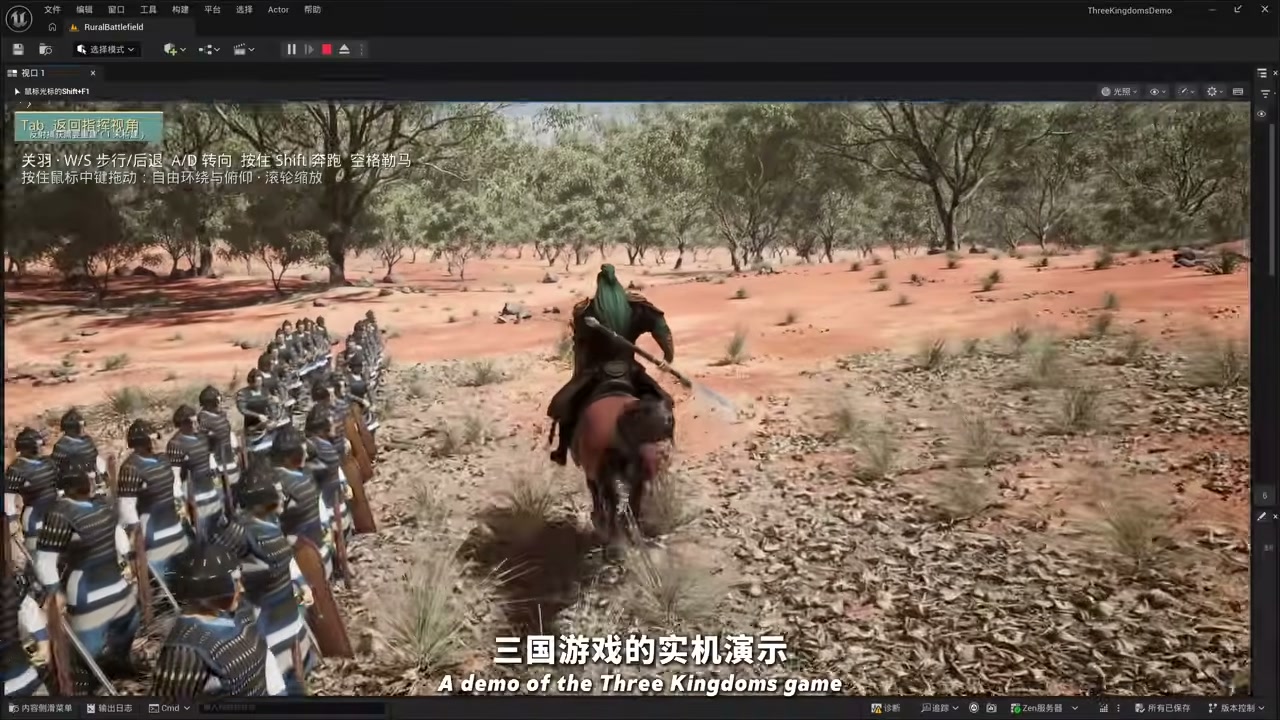
The same system offers two viewpoints: command thousands of troops from a top-down sandbox, or switch to third person and take the reins of a general charging into the fight.
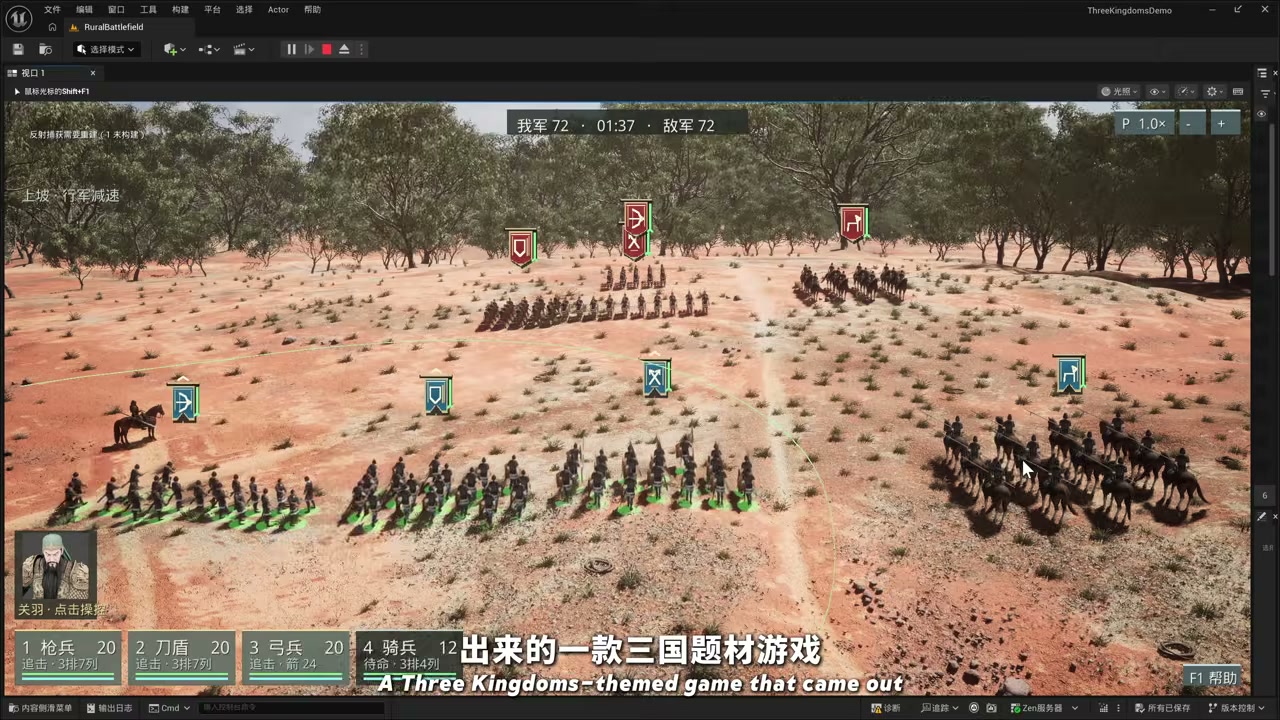
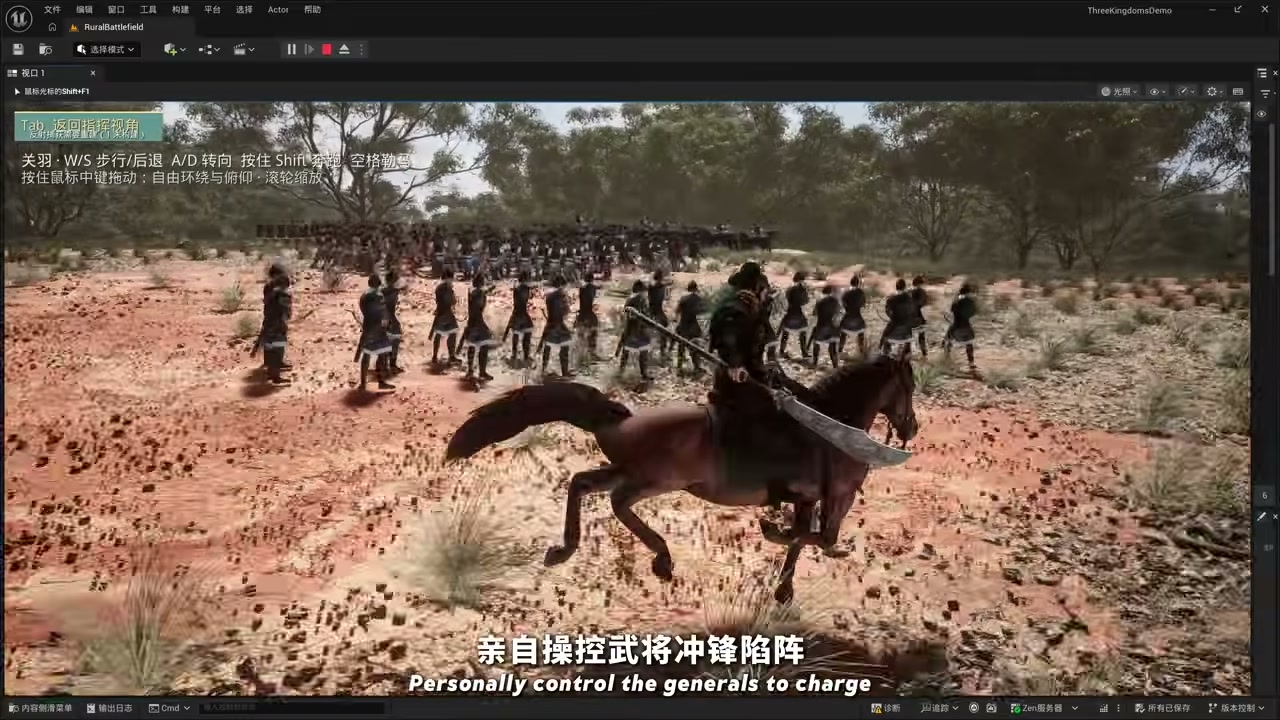
The conclusion first: The code and editor-operation sides of this pipeline are already nearly fully automated. The remaining bottlenecks are the rigging and animation of 3D assets and figuring out how to validate what the agent produces. To understand the boundaries of this workflow, you first need to know what Unreal MCP actually is.
1. The Opportunity: Unreal Engine 5.8 Brings an MCP Server to the Editor
In June 2026, Unreal Engine 5.8 was officially released, with the announcement appearing on Epic’s website on June 23 and on the developer forums on June 17. The most notable feature of this release is not the rendering pipeline, but the official inclusion of the experimental Unreal MCP plugin. Its plugin identifier is ModelContextProtocol, and its path is Engine/Plugins/Experimental/ModelContextProtocol/ModelContextProtocol.uplugin.
Epic’s documentation defines it in very direct terms:
Unreal MCP embeds an MCP server inside the Unreal Editor process so that any MCP-compatible AI agent, such as Claude Code, Cursor, or the MCP Inspector, can drive the editor over a local HTTP connection.
In engineering terms: The MCP server runs inside the editor process, and any client that speaks MCP can drive the engine directly over HTTP on the local machine. It binds to http://127.0.0.1:8000/mcp by default, while serverInfo.name is always unreal-mcp. Both the port and URL path can be changed in the editor preferences.
The capabilities it exposes cover a substantial portion of everyday editor operations:
| Capability | Listed in the official documentation |
|---|---|
| Levels and objects | Spawn actors, inspect Slate widgets |
| Materials and rendering | Configure lighting (configuring lighting), create material instances (creating material instances) |
| Quality assurance | Run automation tests |
| Extensibility | Add more tools through your own Toolset / IModelContextProtocolTool |
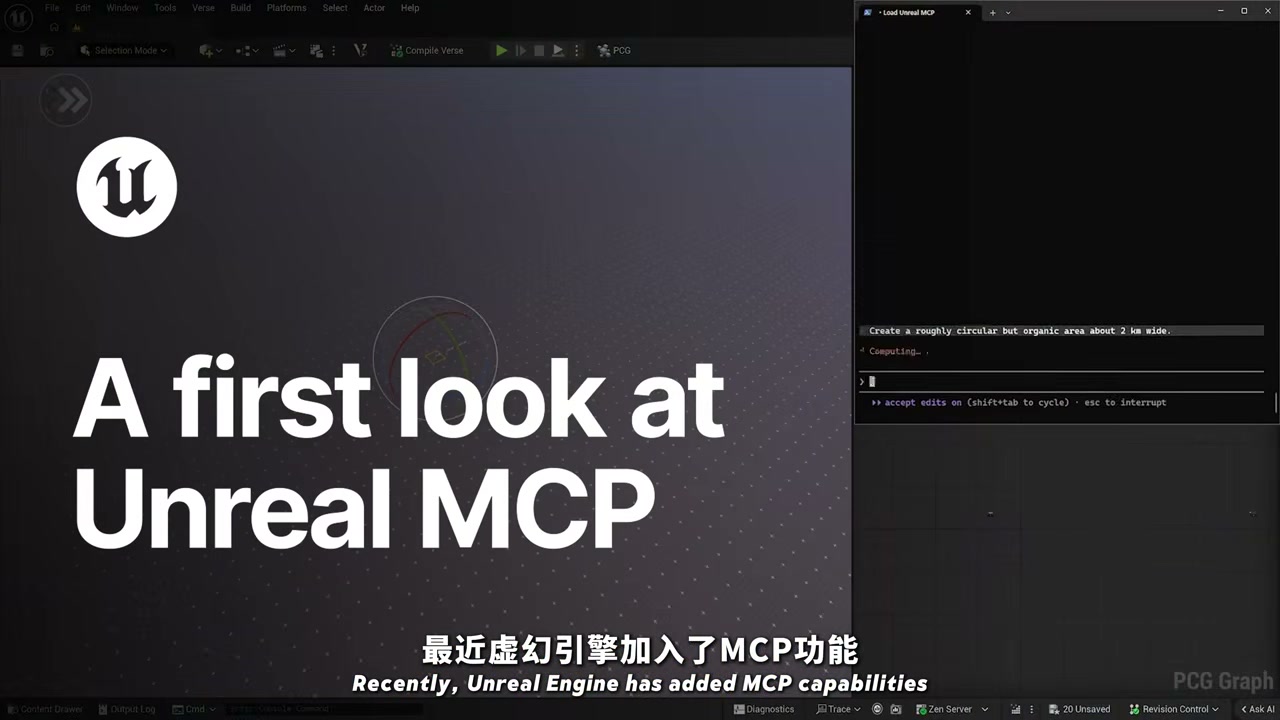
The division of responsibility among the three modules is also worth remembering: ModelContextProtocol and ModelContextProtocolEngine are runtime modules responsible for the server, protocol implementation, settings, and console commands. ModelContextProtocolEditor only handles the automatic startup hook and adapts toolsets from the Toolset Registry into MCP Tools.
The server itself is therefore not hardwired to the editor. A packaged game can also host an MCP server through IModelContextProtocolModule::StartServer(), although the tools in its Registry will not be discovered automatically; each one must be registered manually with AddTool().
⚠️ Epic states at the very beginning of its documentation that this is an Experimental feature and that “many features are incomplete or missing.” It also has no authentication layer, binds only to loopback, and supports only HTTP and SSE; neither stdio nor WebSocket is supported. It is good enough for local development, but do not expose it to a LAN or the public internet.
2. The Complete Pipeline: AI Game Development Split into Three Parallel Branches, All Converging on Unreal MCP
The cleverest part of this approach is not simply that “AI writes code,” but that a game project is divided into three parallel branches, each equipped with its own tools, before everything converges on Unreal MCP. The idea started as a few rough sketches before it grew into the full flow:
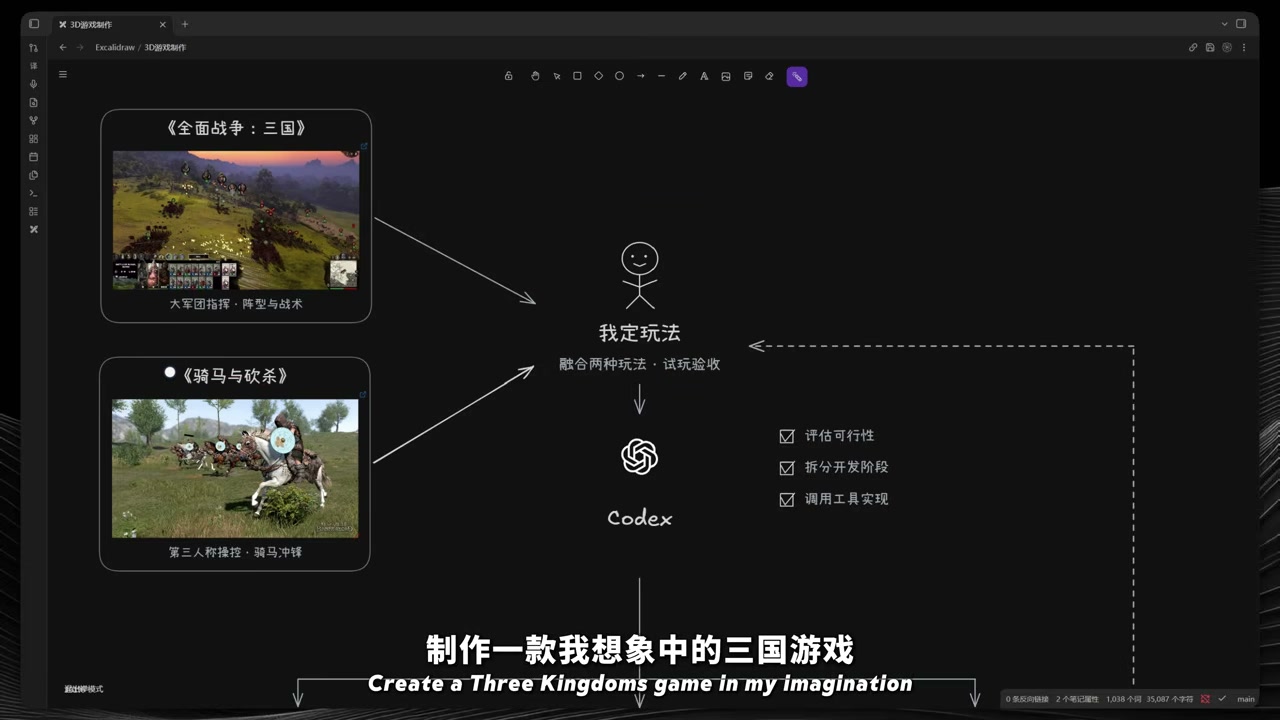
The overall structure looks like this:
1 | +------------------------------------------------------------+ |
What each branch covers, and the tool chain behind it:
| Branch | What it covers | Tool chain |
|---|---|---|
| Gameplay | Prototype to rules: unit selection, formation movement, attacks, casualties, win/loss resolution | Codex → Unreal MCP |
| Character | Modeling, rigging, and motion debugging for the general, the warhorse, and the blade | Hi3D Agent → Blender → Unreal MCP |
| Battlefield | Selecting and placing external assets such as maps and soldier models | Asset libraries + Unreal MCP |
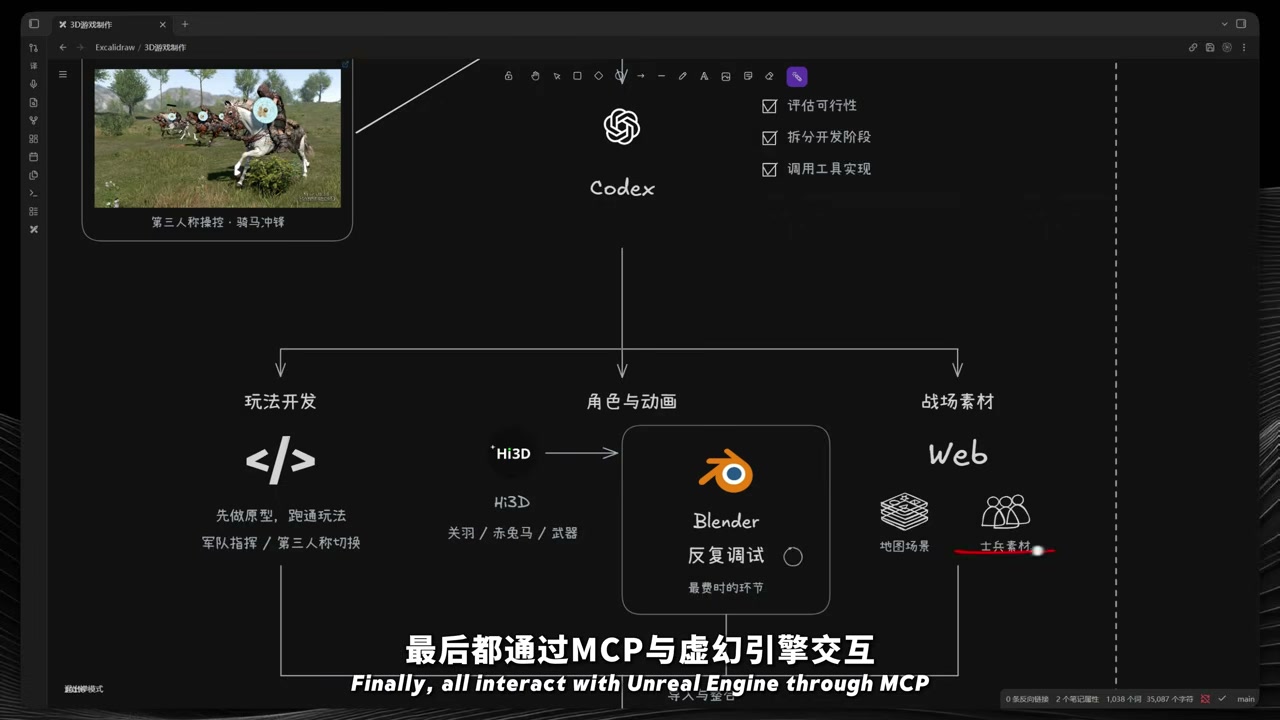
One interesting aspect of this division of labor is that Codex does more than “write code.” It also serves as the project manager, gameplay designer, and task orchestrator. The approach is to have the agent first break a vague idea into “small, independently verifiable steps,” each of which can be played immediately, and then decide which branch to prioritize.
3. Step 0: Have Codex Assess Feasibility First, Then Split into Phases and Produce an Acceptance Checklist
This is the starting sequence for the entire pipeline, and the order cannot be changed. Before writing the first line of code, the agent must answer four questions:
- Which features can be implemented under the current technical constraints?
- What technical challenges are likely to arise?
- What assets need to be prepared?
- What additional knowledge needs to be acquired?
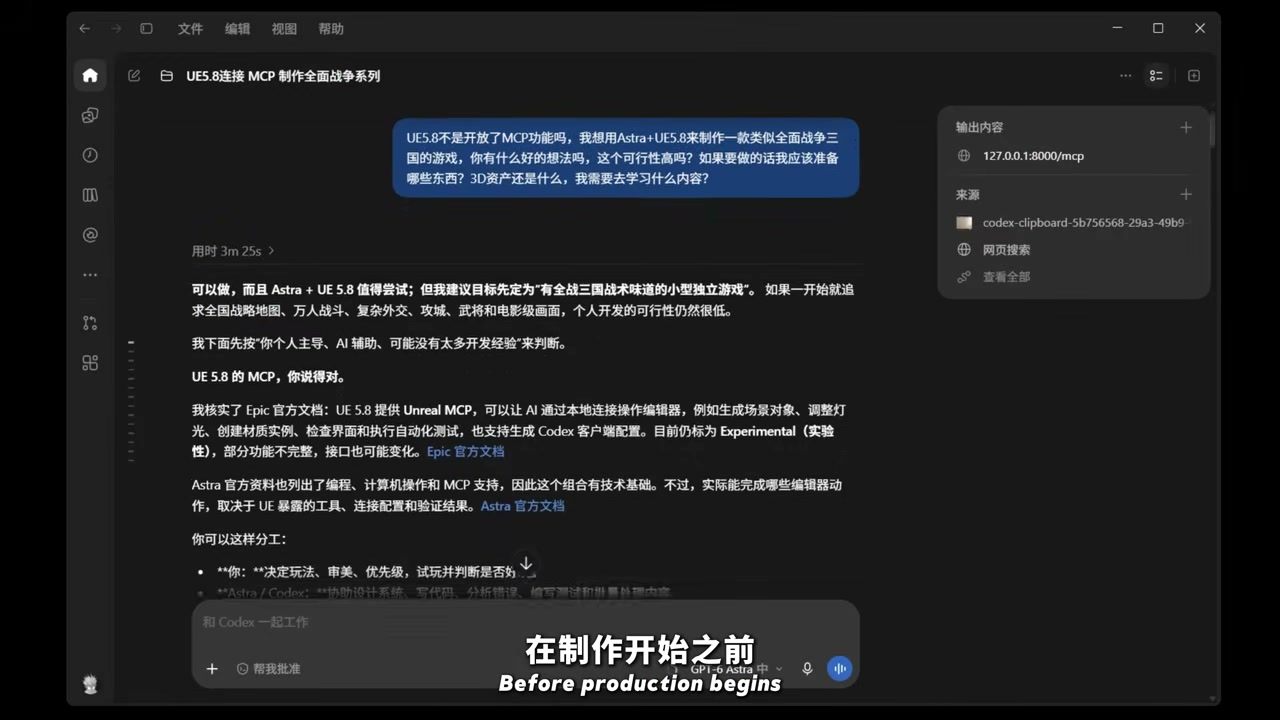
Only then does the process enter the second phase: dividing the entire development workflow into distinct stages and producing a task list. The most valuable design principle in this list is that every step should produce a version that can be validated through actual gameplay, rather than postponing all validation until the end.
The resulting list looks like this. These are the completed foundations and the items still to be tackled:
| Order | Deliverable | Playable result |
|---|---|---|
| Completed | Basic camera, unit selection, formation movement, attacks, casualties, simple enemy counterattacks, win/loss resolution, and restart | A complete loop that can be started and played to a win or loss |
| 1 | Unit avoidance and engagement formations | Clearer formations when friendly units overlap, multiple units crowd around a target, and squads turn or reposition; formations remain legible when several squads move and fight simultaneously |
| 2 | Command controls and Chinese-language UI | Chinese prompts, target markers, number-key unit shortcuts, pause-and-command, and game-speed controls |
| 3 | Morale and routs | Casualties and nearby friendly routs affect morale; retreat and regrouping are added; battles can be won by breaking the enemy’s morale |
| 4 | Flanking and rear attacks | Attack direction is evaluated; flanking and rear ambushes inflict morale penalties; maneuvering around an enemy’s flank or encircling it now provides clear tactical benefits |
| 5 | Unit-class differences | Start with spearmen, sword-and-shield troops, and archers, then add cavalry; allow complementary formations and test cover, ranged attacks, and charges |
| 6 | Battlefield terrain and pathfinding | Add hills, forests, obstacles, and passages; introduce detours and raycast occlusion; terrain affects deployment and attack routes |
| 7 | Enemy tactics | Assign targets, protect archers, and employ reserves; enemies coordinate attacks instead of simply moving toward the nearest target |
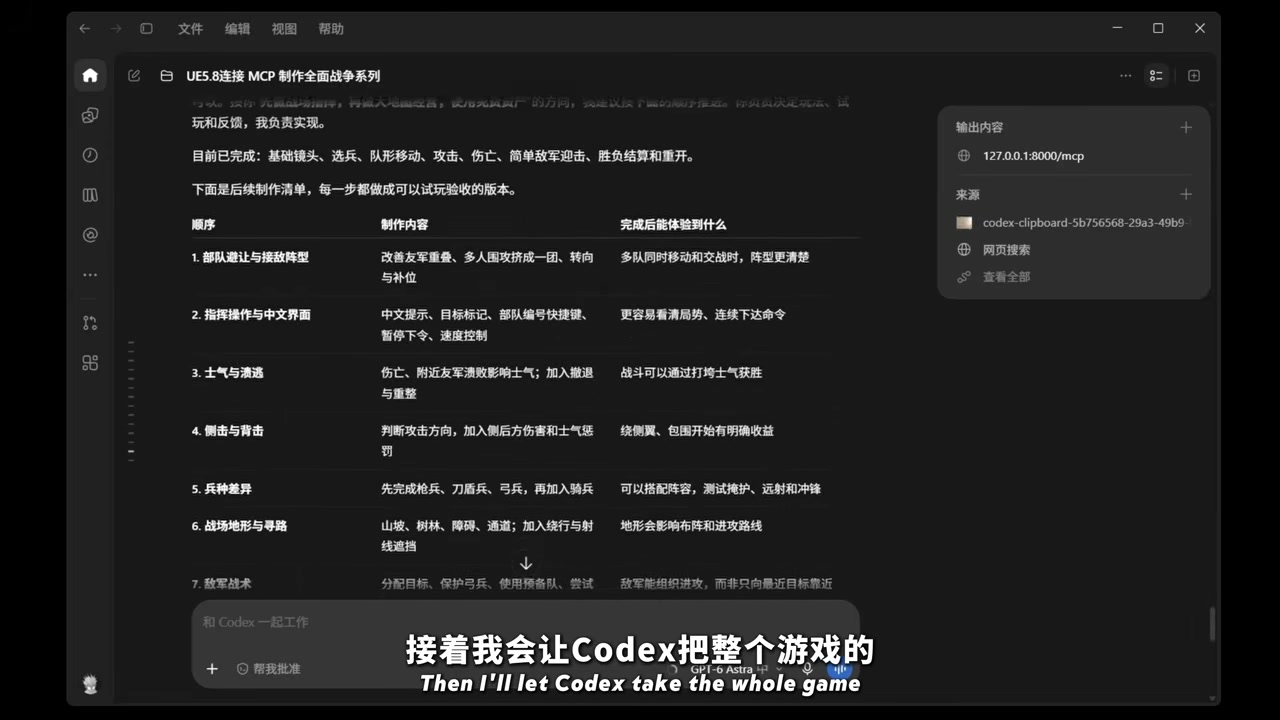
The engineering quality of this checklist is actually one level above “asking AI to make me a plan.” It translates abstract requirements, such as “the combat should feel good,” into verifiable behavior, such as “flanking attacks must provide a clear benefit.” This is precisely what enables the agent to validate its own work later.
The gameplay design draws on the tactical layer of Total War: Three Kingdoms and the third-person control layer of Mount & Blade: The former provides macro-level command, while the latter provides direct control of individual units.
4. The Code Side: What the Agent Actually Does in the Editor
This section best demonstrates whether AI can genuinely work with a game engine. In the actual call logs, the agent uses unreal-mcp tools for tasks such as these:
- Search the project for available assets and subgraphs to determine whether the current step requires an additional asset lookup.
- After finding that the selected subgraph already satisfies the requirement, voluntarily skip an additional lookup. The log explicitly states, “The selected subgraph happens to meet the requirement, so there is no need to search the SGD assets again.”
- Read terrain data, extract point locations, and scatter trees in bulk.
- Replace building-generation nodes: identify a custom
Assign_CityStyleBuildingsprimitive with the parametersminHeight,maxHeight,buildingStyles,staggered, andfoundation, then replace the old entry node with “one primitive per building type.” - Scale and align the overall result. The propagation stage took 58 seconds and approximately 3.1k tokens.
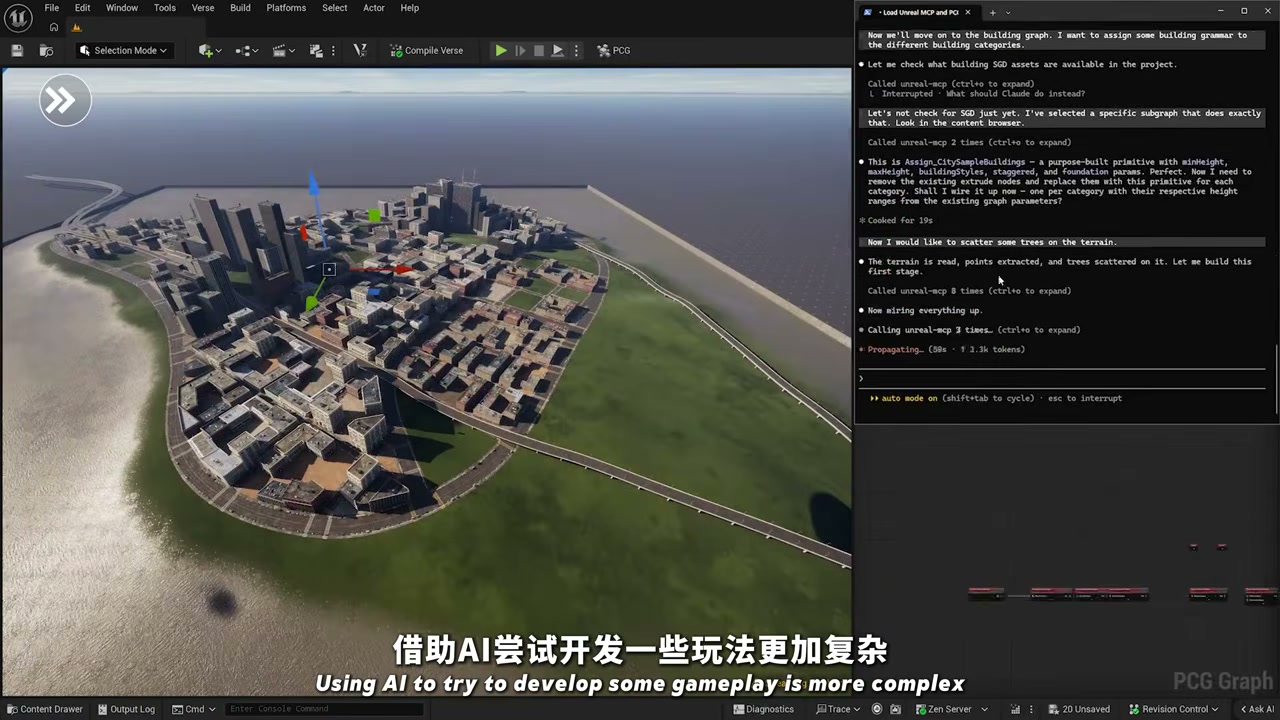
Several key engineering details determine whether these calls can run reliably:
| Mechanism | Official definition | Impact on the agent |
|---|---|---|
| Tool Search mode | By default, tools/list returns only three meta-tools: list_toolsets, describe_toolset, and call_tool |
A project with hundreds of tools will not overwhelm the context window; the agent expands toolsets on demand |
| Threading model | Tool calls execute serially on the game thread | The client must not issue concurrent tool calls, or they will interfere with one another |
| Command-line switches | -ModelContextProtocolStartServer, -ModelContextProtocolPort=N |
The server can be started inside a commandlet for automated workflows |
| Tool refresh | ModelContextProtocol.RefreshTools polls the registry again |
Run it after Live Coding changes a function body; however, adding a new UFUNCTION requires restarting the editor |
Epic also provides a baseline set of toolsets: SceneTools, ActorTools, MaterialInstanceTools, and ObjectTools are implemented in Python, while the C++ side includes UAttributeSetToolset in the GASToolsets plugin, which is disabled by default.
The rules for adding your own tools are clear. On the Python side, use @unreal.uclass() + @toolset_registry.tool_call + @staticmethod. Type annotations automatically generate the JSON Schema, while docstrings should use the Google-style Args: and Returns: fields. On the C++ side, inherit from UToolsetDefinition and add meta = (AICallable).
How well you write the description directly determines whether the agent chooses your tool. This is one of the most underestimated costs of authoring a Toolset.
5. The 3D Asset Side: Hi3D Agent Compresses “Modeling” into a Single Sentence
In a game project, the most expensive resource has never been the code. It is the art assets. This pipeline brings in Hi3D Agent, a 3D creation agent from Hi3D, an all-in-one AI 3D creation platform developed by Math Magic. It was released on September 21, 2026, and is officially described as “the world’s first all-in-one AI agent built specifically for 3D creation.” It is built on Hi3D V3.0, the first commercial AI 3D model with a voxel-level resolution of 2048³, and includes GPT-6 Astra on the agent side.
The actual operating sequence is as follows: Generate a prompt image → generate the model in the cloud → have the agent separate it into parts → register it in the asset library. One generation job left a complete audit trail:
- Cloud generation produced two model versions:
chitu · v2(GLB 47.17 MB) andchitu · v3(GLB 191.58 MB). - The agent completed 6 operations in one task: 1 reasoning step and 5 tool calls.
- Automatic part separation: Red Hare’s mane and tail were split into independent meshes, allowing each to be selected, hidden, or repositioned separately. This step nearly determines whether the subsequent rigging succeeds.
- Final deliverable: The model was registered as an asset containing 10 independent components, including the mane and tail.
- Critical limitation: It is not yet rigged to a skeleton, and physics simulation has not been enabled.
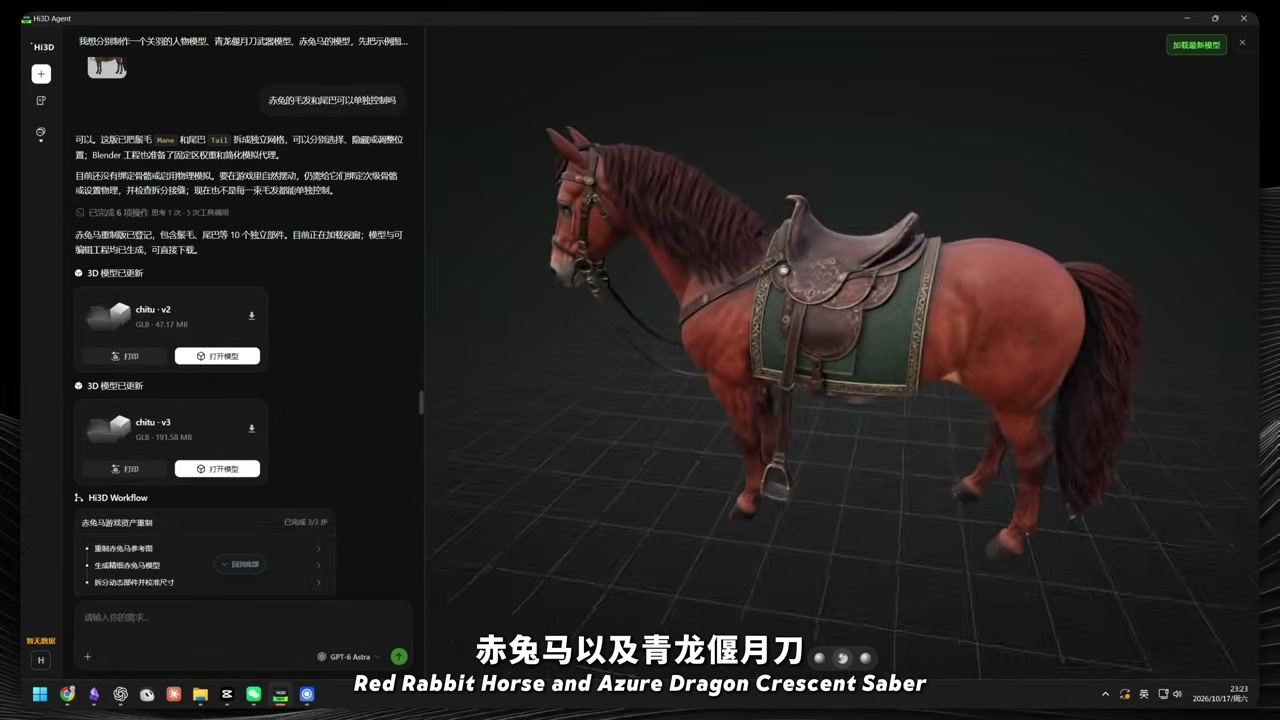
The platform’s supporting capabilities also include 3D Model Maker for image-to-3D conversion, texturing, part separation, and multi-format export; AI Texturing; Split for 3D Printing, which separates models and automatically adds connectors; and multicolor printing. Billing is credit-based, new accounts can receive credits upon registration, and new users receive a 48-hour free trial.
⚠️ Two practical problems should be understood in advance. First, the GLB file size—47 MB or 192 MB—will inevitably exhaust memory if imported directly into UE. It requires decimation, LODs, and texture compression. Second, Hi3D does not solve rigging or animation. It saves the time required to build a model from scratch, not the work required to make it move.
6. Blender Is an Intermediate Layer You Cannot Skip
The final versions of the Guan Yu, Red Hare, and Green Dragon Crescent Blade set were therefore refined through repeated rounds in Blender. After importing the models into Blender, the agent helped debug the skeleton and motion. The footage shows at least three rounds of “one more adjustment,” with each pass addressing one specific issue in the same movement, before the assets were imported into Unreal Engine for testing.
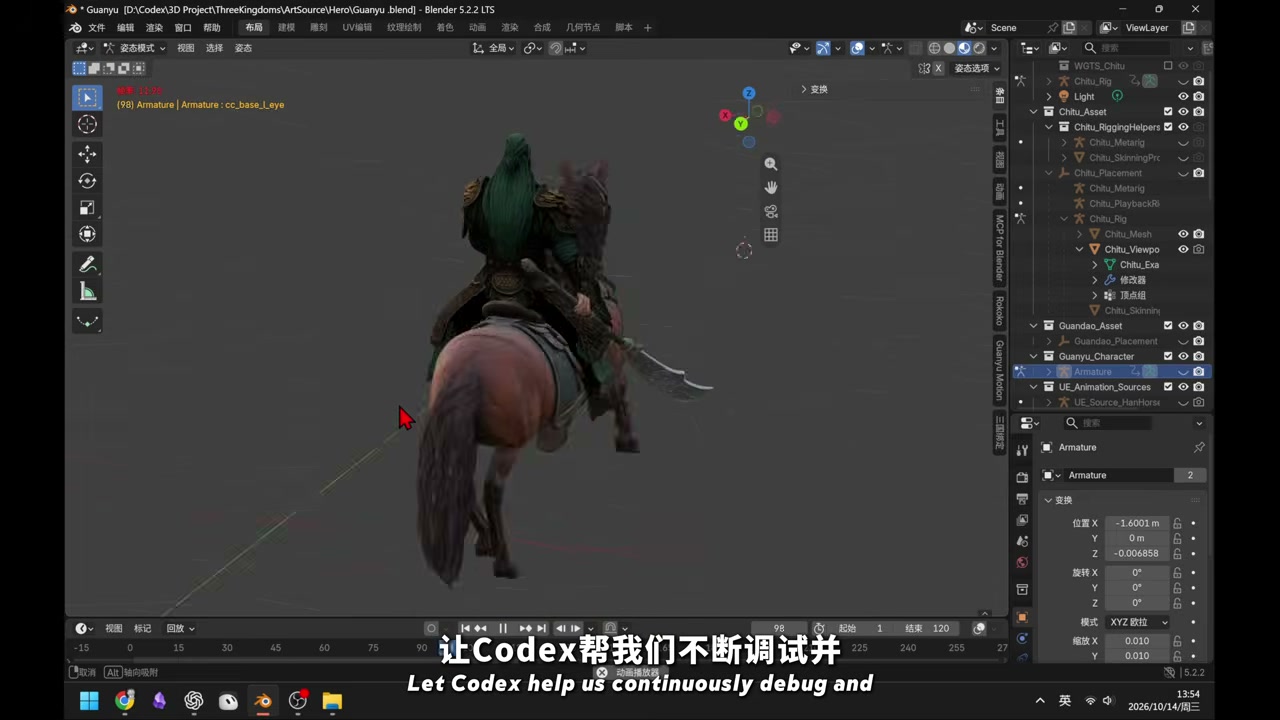
The role of this stage needs to be stated clearly: AI compresses the first half of asset production—concept image → high-resolution mesh → part separation—into a matter of minutes. However, the second half—skin weights, bone hierarchy, animation curves, collision meshes, and LODs—remains a difficult task requiring close collaboration between a human and the agent. If you skip Blender and import an AI-generated model directly into UE, the usual result is a model twitching in place.
7. Prototype Discipline: Characters First, Content Later
The project’s original prototype was extremely crude: it contained only blockout characters and a simple test scene. Its sole purpose was to verify whether the basic features could work. Only after the core loop—unit selection → formation movement → attack → casualties → win/loss resolution → restart—was working did Codex begin gradually adding content, selecting suitable maps and soldier assets from the library and building out the battlefield environment one piece at a time.
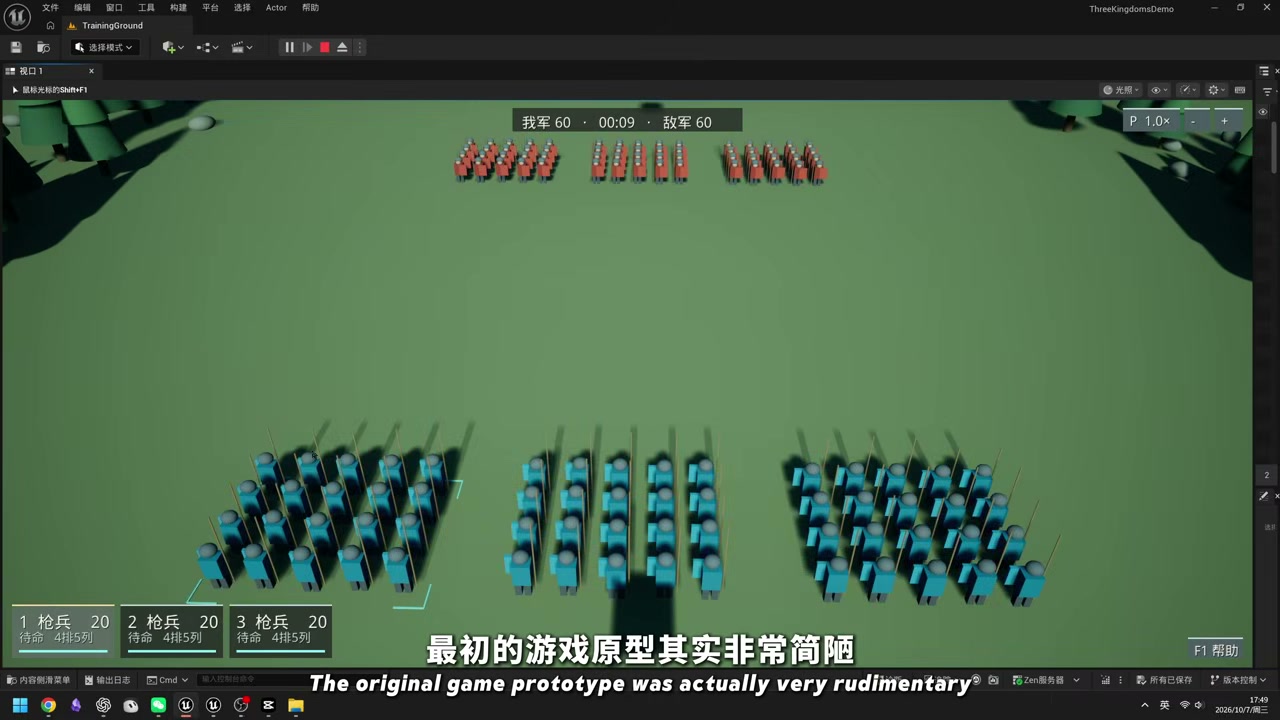
This sequence deserves special attention because it is the key to completing the project in “one week”: Content richness can be postponed, but the gameplay loop cannot. Many people use AI to do the opposite, piling up assets and environments before discovering that the core loop is not fun. At that point, all the assets have been wasted.
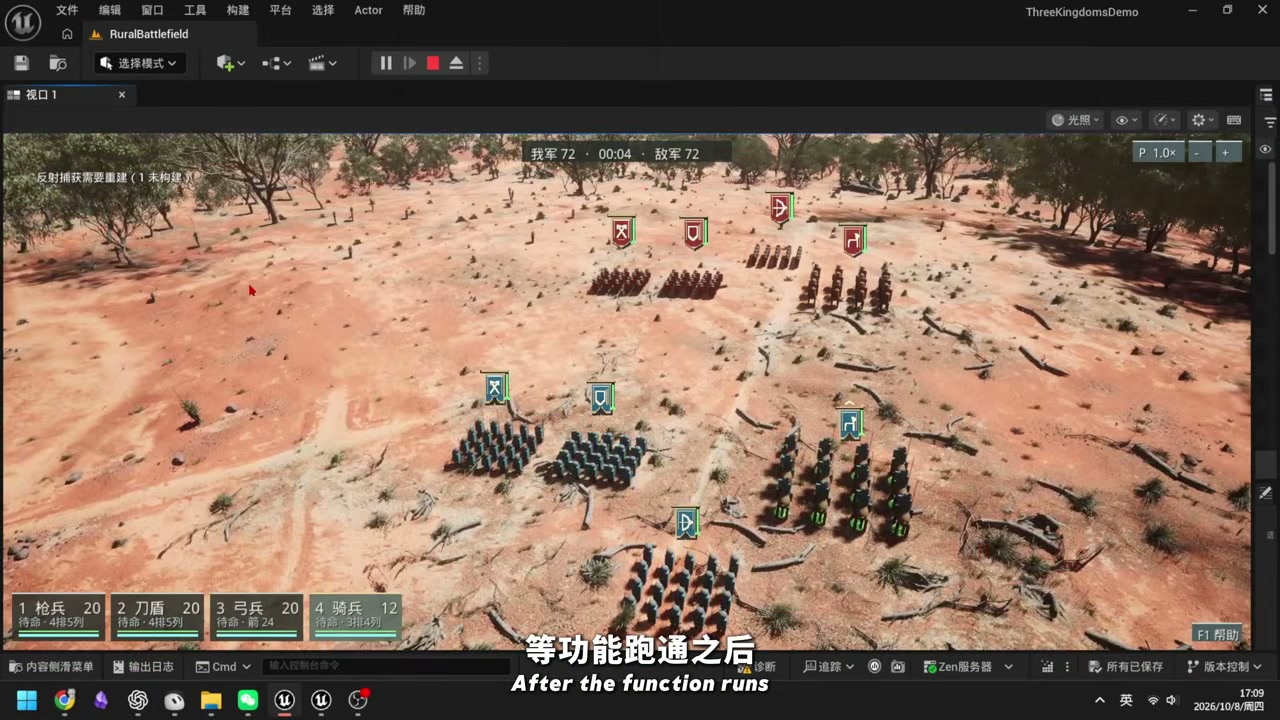
It is also worth mentioning asset licensing compliance. Maps and soldier assets generally come from online asset libraries, with Fab being the primary source in the UE ecosystem. Commercial use requires a valid license. The historical Three Kingdoms setting itself is not copyrighted, but every specific art asset you use is. This pipeline does not address licensing in any way.
8. Nine Unreal MCP Connection Pitfalls
Unreal MCP is an experimental feature, and Epic’s own documentation states that “many features are incomplete or missing.” The following issues come from real troubleshooting records on the Epic Developer Forums and the official documentation. Follow them directly:
- The endpoint must be
http://127.0.0.1:8000/mcp, not bare:8000. Connecting to the root path establishes the TCP connection but immediately drops at the protocol layer. It appears as an “instant disconnect” and is easily mistaken for a broken plugin. - Use GET for the health check:
GET http://127.0.0.1:8000/mcpreturning 405 means the server is alive. Then POST aninitializepayload to complete the handshake. - The server runs inside the editor process. Wait until the editor has finished loading, including the map and shaders, before connecting. The connection can survive an editor restart, but not a client restart; the client must reconnect after restarting.
- “MCP Client Toolset” makes UE act as an MCP client. It is unrelated to providing a service to external clients, and enabling it will not repair inbound connections.
- If
list_toolsetsreturns onlyAgentSkillToolset, the toolset plugin has not been enabled in the project. This is unrelated to the server itself. - Codex CLI’s TOML configuration is write-once.
GenerateClientConfigrefuses to overwrite an existing file. To regenerate a stale configuration, delete it manually first. The JSON-based.mcp.jsonis merged instead, so it is safe to run repeatedly. - Live Coding does not propagate new
UFUNCTIONdeclarations. Function bodies can be hot-reloaded, but the editor must be restarted to add a new tool. Afterward, runModelContextProtocol.RefreshToolsand reconnect the client. - Only HTTP and SSE are supported. Neither stdio nor WebSocket is supported. There is no authentication, and the server binds only to loopback.
- Running an agent in the editor’s embedded terminal requires two additional steps:
export TERM=xterm-256color, and an explicitcdto the directory containing.mcp.json. The terminal panel starts in the engine installation directory by default. Without the first command, CLIs such asclaudemay degrade into raw escape sequences.
There are also three official diagnostic entry points: the LogModelContextProtocol log category, enabled in the console with Log LogModelContextProtocol Verbose; startup binding information in the output log; and MCP Inspector (npx @modelcontextprotocol/inspector, using Streamable HTTP against http://127.0.0.1:8000/mcp).
When a tool call fails, use Inspector first to rule out a misunderstanding by the agent itself. This step often identifies the problem immediately.
9. Who This Workflow Is and Is Not For
| Suitable for | Not suitable for |
|---|---|
| Indie developers building gameplay prototypes / playable demos to test whether a mechanic is fun | Projects targeting finished-art quality; AI-generated assets still fall short of commercial quality |
| Artists or technical artists who already know UE and can read Blueprints, C++, and the asset pipeline | People with no UE knowledge; the agent can build things for them, but they will not be able to validate what it produces |
| Rapid validation of internal tools, level prototypes, and small internal games | Teams unfamiliar with IP and asset compliance; licensing problems can directly block a release |
| Teams trying to turn “AI can make games” from a slogan into measurable engineering work | Anyone expecting an agent to deliver final art end to end in a single pass |
10. One-Week Reproduction Checklist
To reproduce this workflow with UE 5.8, Codex, and MCP, follow this order:
- Install UE 5.8, enable Unreal MCP and All Toolsets under
Edit > Plugins—the latter also enables the Toolset Registry—and restart the editor. - Go to
Edit > Editor Preferences > General > Model Context Protocol, enable Auto Start Server, and confirm that the port is8000and the path is/mcp. - Run
ModelContextProtocol.GenerateClientConfig Codexin the editor console. UseAllto configure multiple agents at once. This generates the configuration file in the project root. - Launch Codex from the project root. Starting it from another directory prevents it from finding the MCP configuration.
- Have the agent produce a feasibility assessment, phase breakdown, and task list, with every acceptance criterion written as playable behavior.
- Build a blockout prototype that validates only the core loop: unit selection → movement → attack → casualties → win/loss resolution → restart.
- Add the remaining three areas: gameplay rules, 3D assets (Hi3D generates the model → Blender adds the skeleton and animation → decimation → import), and the battlefield environment.
- Playtest and validate after adding each area. Do not wait until the end.
Summary: AI Divides Game Development into “Three Parallel Tracks”
The real conclusion of building a playable Three Kingdoms tactics prototype in one week is not that “AI can make games.” It is that game development can be divided into three parallel tracks: gameplay, character animation, and battlefield assets, each assigned to an agent (with planning handled centrally by Codex), all three converging on the same engine through Unreal MCP. The bottleneck shifts from “writing code” to “validation” and “post-processing art assets.”
For anyone looking to try this, the recommended priority is to spend half a day getting Unreal MCP working by following the nine pitfalls in Section 8, then spend another half day having the agent get the gameplay prototype running. Together, these two steps take one day and reveal the ceiling of this pipeline.
If you want to understand the general pattern behind “MCP connects professional tools to an agent,” you can also read REA Reverse-Engineers Everything: A Hands-On MCP Test. It applies the same idea in reverse engineering. Codex’s own iteration schedule is covered in Codex Six-Month Update Roundup, while the underlying model-side logic is examined in A Breakdown of the Underlying Logic of AI Large Models.
Feel free to share your thoughts in the comments: If you could keep only one stage of this pipeline, which would you choose? Or, if you have already used MCP to drive a tool, please share your troubleshooting experiences.
References
- Unreal MCP in Unreal Editor (Official Unreal Engine 5.8 Documentation)
- Unreal MCP Plugin API Index (ModelContextProtocol.uplugin)
- Unreal Engine 5.8 Release Notes
- Developer Forum: 5.8 Experimental MCP Server Instantly Drops Connections
- Official Model Context Protocol Specification
- Hi3D Agent Product Page and Hi3D Agent Press Release (2026-09-21)