
The Ultimate MiniMax H3 Workflow: DMAD-Accelerated LoRA + Single-Node Two-Pass Sampling — 12 Steps for Both Dialogue and Action Scenes
In the past month, both the accelerated LoRA ecosystem and the two-pass sampling nodes for MiniMax H3 have gone through a wave of dense updates — a lot of workflows that people had already tested should now be rewritten from scratch. We’ve consolidated the most noteworthy changes from this wave into one place: ByteDance’s new DMAD 4-step accelerated LoRA, the Step600 × DMAD merged “hybrid accelerated LoRA,” a new implementation that wraps two-pass sampling into a single ComfyUI node, and a brand-new workflow that packs the speed slider, martial-arts combo LoRAs and everything else into one base framework — once you get this parameter table dialed in, even a 12GB-VRAM card can output 1080P, 10-second video.
Below is the practical experience broken out from an engineering angle, directly mappable to specific ComfyUI nodes. The parameter templates for dialogue scenes and martial-arts scenes have been tested multiple rounds — feel free to copy them directly.
I. Why Rewrite the H3 Workflow Again
MiniMax H3 is a general-purpose omnimodal video generation model open-sourced by MiniMaxAI (MiniMax) at the end of July 2026. It defaults to 768p output and can generate up to 15-second, 2K video with native dual-channel audio. For our earlier engineering deep-dive, see: Engineering Breakdown: A Martial-Arts Video Generation Workflow with MiniMax H3 on a 12GB-VRAM Card.
In the month since open-sourcing, the ecosystem around H3 has roughly split into three categories:
- Accelerated LoRA: Solves the problem of the default 50 steps being too slow in practice. It went from Step600 being the sole early winner to a flowering of 8-step / 4-step Turbo LoRAs.
- Two-pass sampling nodes: Scale 768p output directly to 1080p / 2K. The mainstream approaches now split into two technical paths: “external two-pass” and “internal two-pass.”
- Martial-arts / high-dynamics LoRA combos: Use dedicated physics / motion LoRAs to patch H3’s default weakness of “smearing / tearing” under dramatic camera moves.
However, most combinations either end up too greasy, too blurry on high-dynamics shots, or blow through VRAM. Truly working workflows that handle both dialogue and action scenarios are rare. The workflow in this article has been verified to run on a single 12GB-VRAM RTX card and represents today’s balanced sweet spot for image quality, speed, and stability.
II. Workflow Overview
The overall design stays consistent with the official base workflow — only a few key nodes get swapped:
| Area | Previous Edition | This Edition |
|---|---|---|
| Main model | H3 Base (2549) | H3 Base (2549) ← unchanged |
| Accelerated LoRA | Step600 | DMAD + Step600 merged version (0.8) |
| Attention acceleration | Third-party | Official Linear-Attention node |
| Martial-arts LoRA combo | None | Four Rabbits · Speed slider + martial-arts combo |
| Two-pass implementation | Two-stage traditional two-pass | Single-node embedded two-pass (YinLao’s GitHub project) |
| Latent upscaler | Single upscale model | LMS (sharper) |
| Integration pack | Self-built | Based on Qiuye ComfyUI 3.2 stable |
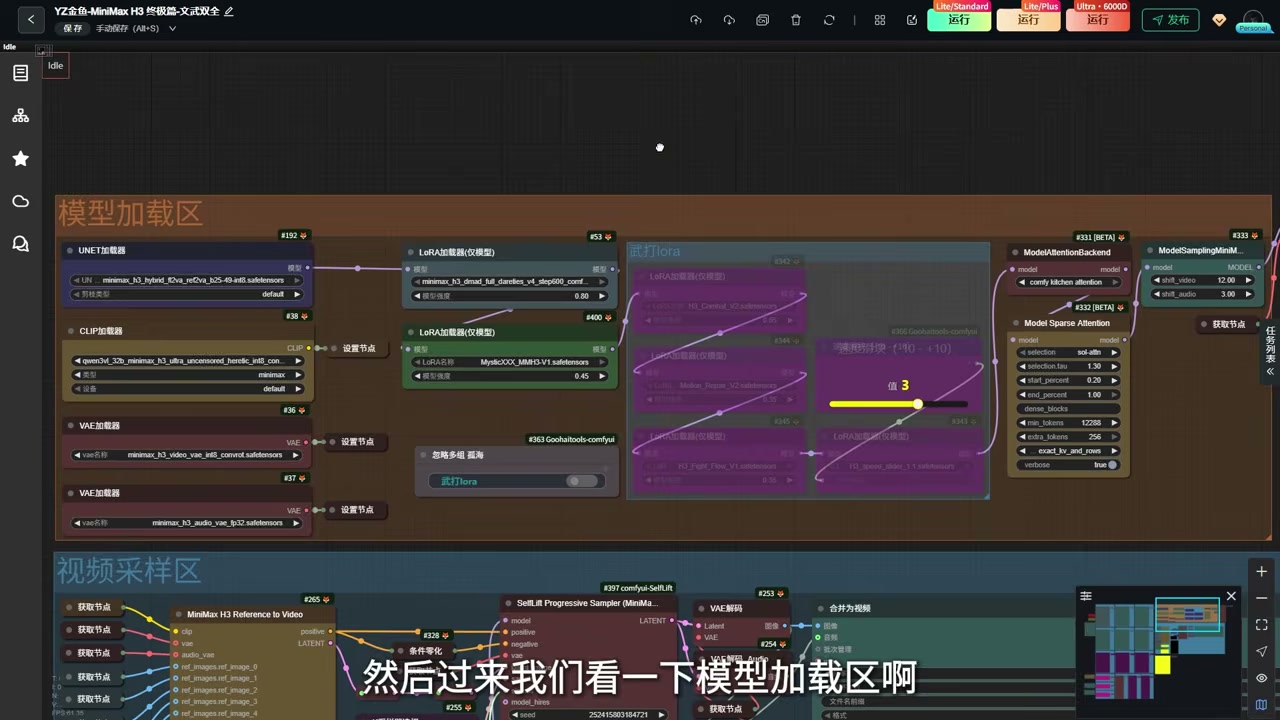
The resource reference area (image / audio / video) is identical to the official version — just toggle off any references you don’t need, no further explanation needed.
III. Accelerated LoRA: From Step600 to the DMAD Merged Version
3.1 Step600 Is Still the Steadiest Baseline
Step600 was the recommended accelerated LoRA in the previous edition of this workflow. It generates images in 4 ~ 8 steps with noticeably better prompt adherence and image quality than the early Turbo line — in this edition it’s built in as a fallback: if you’re not satisfied with the output, pushing it alone up to 0.9 ~ 1.0 will still produce a workable baseline clip.
3.2 ByteDance DMAD: A Real 4-Step Fit
The DMAD accelerated LoRA recently open-sourced by the ByteDance team is the biggest variable this month. Its defining feature is “true 4-step” — it really does converge in 4 steps as advertised, no need to quietly bump it up to 6 ~ 8 steps like other LoRAs to work well. Its strength is no greasy artifacts; its weaknesses:
- Under high-dynamics camera moves, 4 steps clearly isn’t enough — you’ll see motion blur or inter-frame inconsistency.
- Prompt adherence and overall image quality still fall short of Step600.
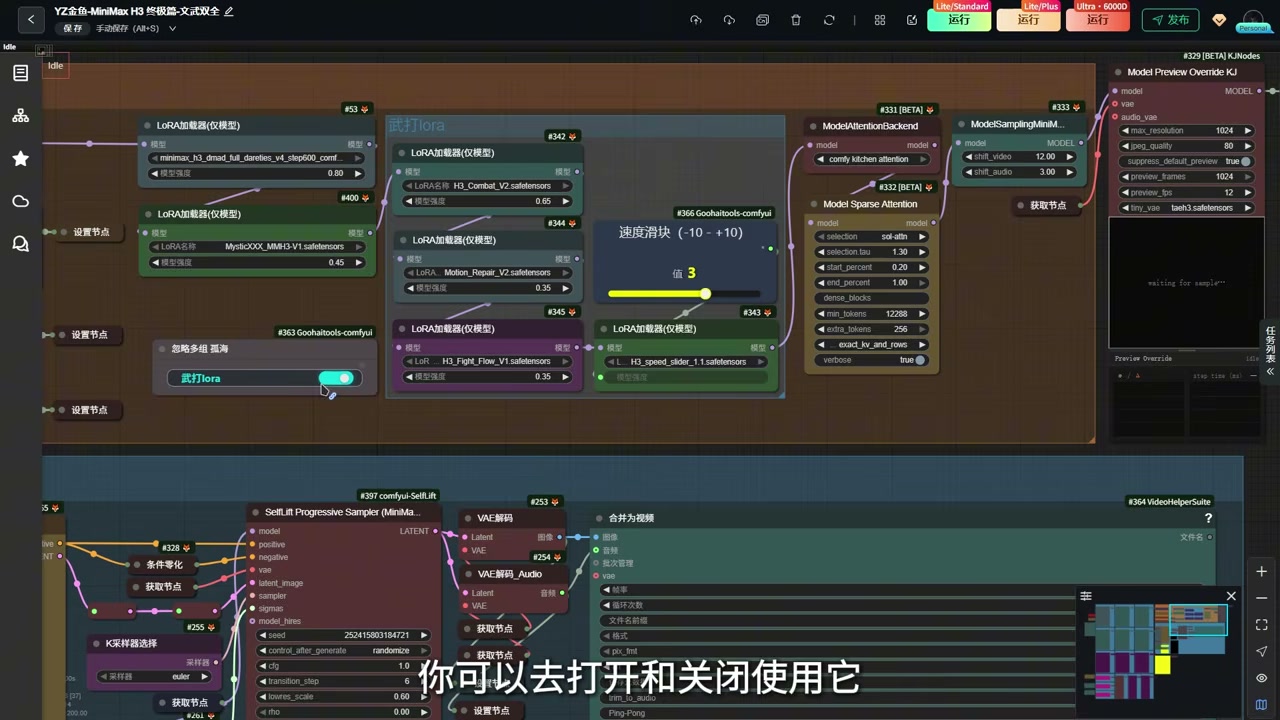
3.3 Step600 × DMAD Merged Accelerated LoRA
An author on CivitAI came up with the solution: weight-merge the DMAD and Step600 LoRAs into a single hybrid accelerated LoRA that combines DMAD’s “4-step fitting speed” with Step600’s “image quality / prompt adherence.” This is the default accelerator in this edition of the workflow.
| Parameter | Recommended Value | Notes |
|---|---|---|
| Strength | 0.8 | Going above 1.0 will cause overfitting + slight greasy look — the author explicitly advises against it |
| Stacking | Don’t stack the standalone Step600 / DMAD on top | The merged version already contains both |
| Universal for dialogue / action | ✅ | No conflicts when used alongside the martial-arts LoRA |
In practice, pushing the merged version down to 0.7 gives finer detail for dialogue scenes, but 0.8 remains the sweet spot for most scenarios.
3.4 The De-Greasy LoRA Is Still Kept
The “de-greasy LoRA” recommended in the previous edition is still built in, but disabled by default. The merged accelerated version rarely produces greasy output, so just leave it off; if you switch to a single LoRA and find the output greasy, turn it back on. Think of it as a safety net rather than a required option.
IV. The Savior of Action Scenes: Four Rabbits · Martial-Arts + Speed Slider Combo
H3’s long-standing problem of “watching the action correctly but losing the camera move” in high-dynamics martial-arts scenes is the issue this section addresses. This version of the workflow has been specifically wired up to a combo of LoRAs made by Bilibili UP-creator Four Rabbits, enabled through a single switch on the node:
- Martial-arts LoRA: Adds real physical feedback and impact feel; patches high-dynamics camera moves.
- Spatial physics LoRA: Prevents characters from “clipping / floating” under aggressive camera moves.
- Camera motion LoRA: Makes the moving camera itself behave according to kinematic logic.
Stacking all three LoRAs together is the sweet spot — paired with the merged accelerated LoRA, it gives the steadiest output.
4.1 The Speed Slider LoRA: ±10 Adjustment
The most interesting extra loaded on top of this combo is a small speed slider LoRA that lets you continuously adjust the action speed of martial-arts / dialogue scenes over a -10 ~ +10 range:
- Slide right (+): faster action.
- Slide left (-): slower action.
- Going beyond ±5 is not recommended: beyond 5, the action pacing becomes too fast or too slow and the image distorts.
- Default value 3: a balanced position that works for both dialogue and action scenes.
V. Official Native Attention Acceleration + Preview Node
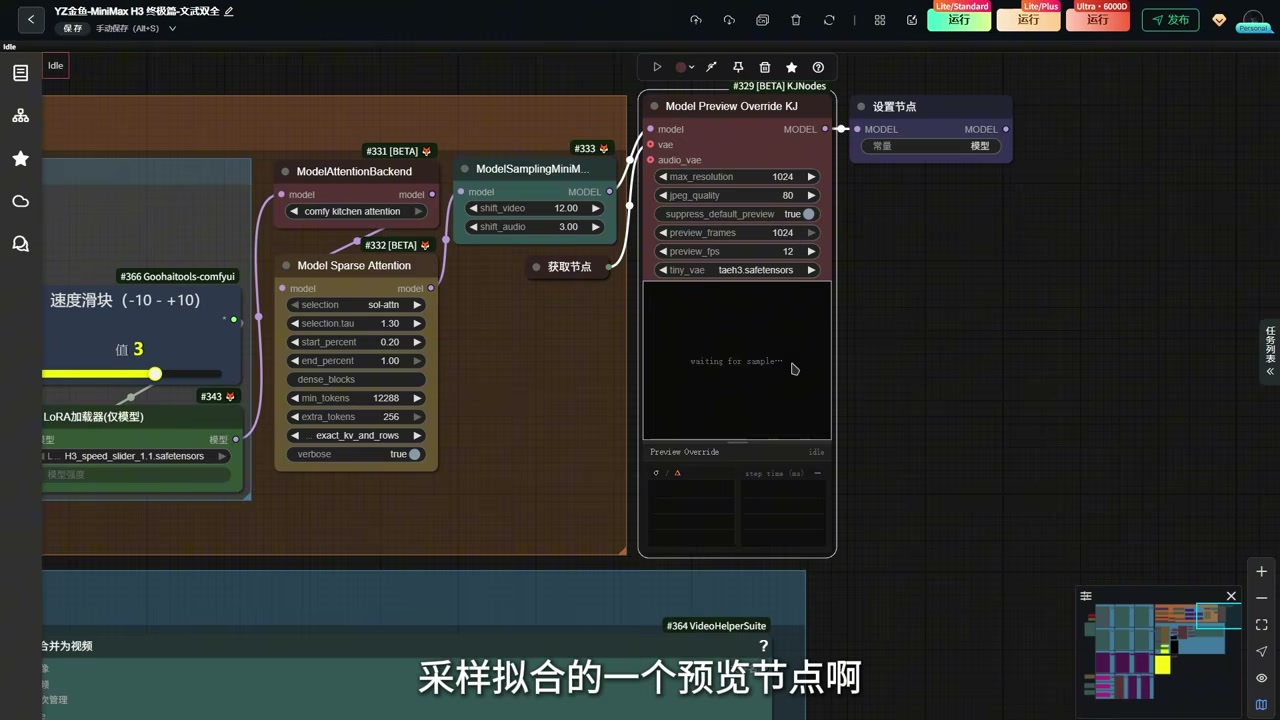
This edition drops the third-party attention acceleration node we used previously and switches to ComfyUI’s official new Linear Attention acceleration node. In practice, it remains the most stable attention-acceleration option available, and overall generation time gets shaved a bit further.
One more bonus recommendation: Hook up the official KG fitting preview node in front of the first-pass sampler — it shows the convergence contour in real time during sampling, so big problems (like a wrong LoRA strength setting or prompt going off-topic) can be caught early, instead of waiting for the full step count to finish only to discover a disaster.
VI. Single-Node Embedded Two-Pass Sampling: One Node Replaces Two
6.1 How Two-Pass Sampling Used to Be Done
Conventional “external two-pass” sampling requires two steps: first run a complete integer-step generation at 768p to produce the low-resolution video, then use a separate upscale node to lift it to 1080p. The upside is clean logic; the downside is too many nodes and too many failure points, and the VRAM often blows up before being rescued.
6.2 This Edition’s Single-Node Embedded Two-Pass Sampling
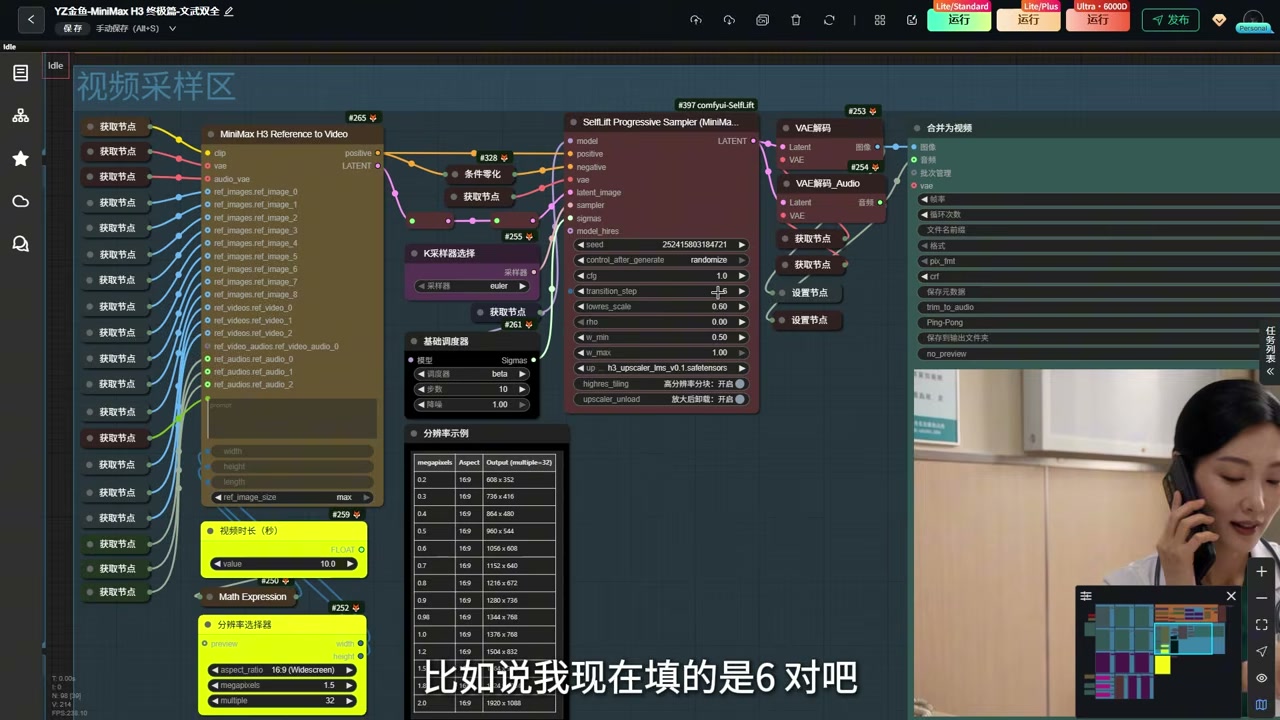
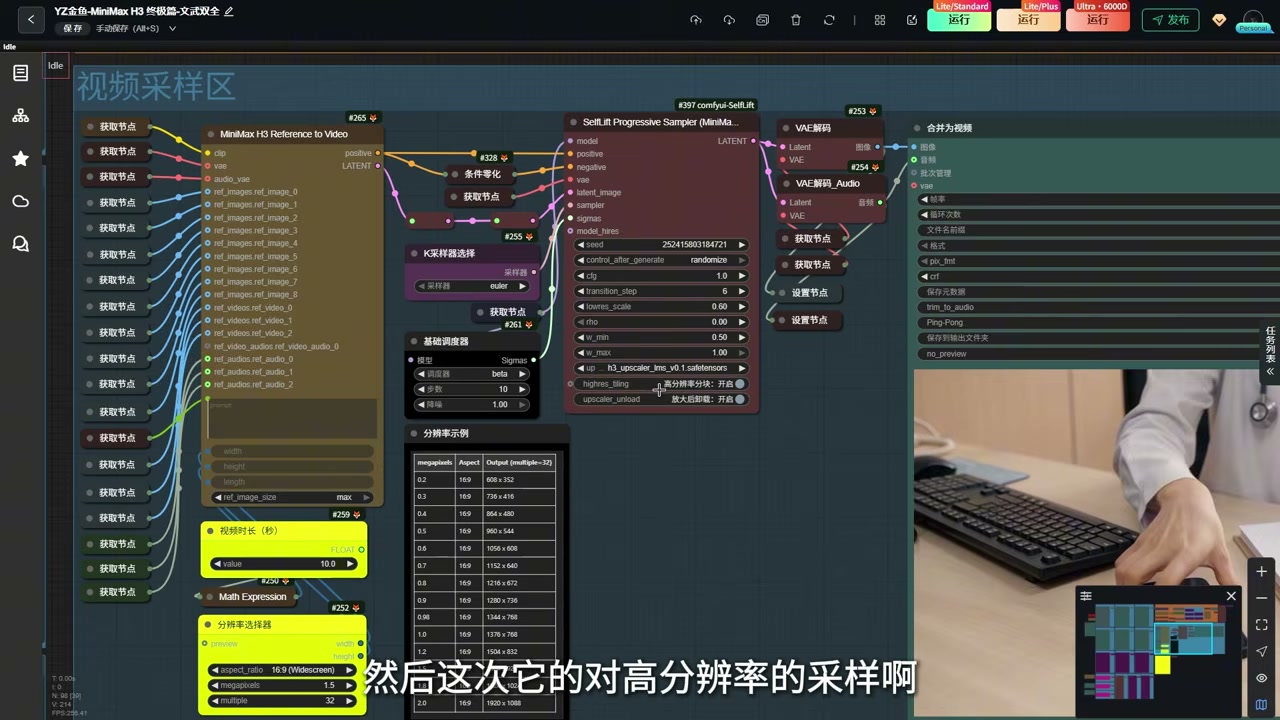
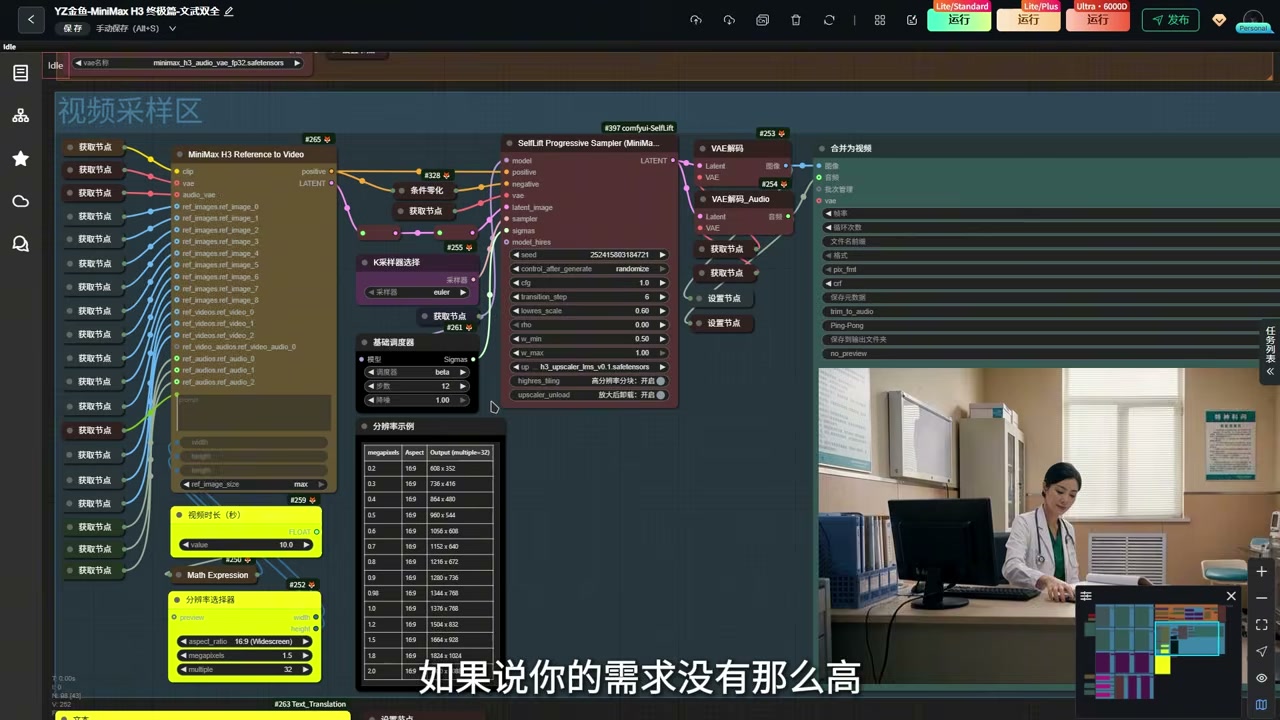
YinLao published on GitHub an implementation that merges the two stages of external two-pass sampling into a single node — when the first pass reaches the midpoint, it automatically switches resolution and continues running until the target step count. The entire pipeline collapses from two sampler nodes + one upscale node down to a single sampler node.
The two most critical knobs on this embedded two-pass node are:
| Parameter | Meaning | This Edition’s Default |
|---|---|---|
| Total steps | All denoising steps across first pass + second pass | Dialogue 10 / Action 12 |
| First-pass steps | Steps reserved for the first pass only (the rest auto-allocate to the second pass) | Dialogue 6 / Action 6 |
| First-pass resolution | Relative resolution used during the first pass | 0.60 (≈ 1056×608) |
| Second-pass resolution | Final resolution at the second-pass stage | 1.5× (fine for dialogue; recommended ≥ 1.8× for action) |
The arithmetic is simple: second-pass steps = total steps − first-pass steps.
6.3 Two-Pass Sampling Plus the LMS Upscaler
The Latent upscaler has been swapped to LMS this edition. In practice, the output is noticeably sharper than the default:
- LMS focuses on preserving detail (sharp edges, textures, handwriting) without the “rubbery” feel of traditional upscalers.
- Under the two-stage pipeline of first-pass 0.60 + second-pass 1.5+, the 1080P output shows a visible difference in clarity.
6.4 Parameter Template Cheat Sheet
After multiple rounds of testing, the following two parameter templates can be copied directly:
Dialogue scenes (prioritize speed / prefer fine detail):
| Item | Value |
|---|---|
| Total steps | 10 |
| First-pass steps | 6 |
| Second-pass steps | 4 (auto) |
| First-pass resolution | 0.60 |
| Second-pass resolution | 1.5 |
| Speed slider | +3 |
Action scenes (prioritize motion clarity / high-dynamics):
| Item | Value |
|---|---|
| Total steps | 12 |
| First-pass steps | 6 |
| Second-pass steps | 6 (auto) |
| First-pass resolution | 0.60 |
| Second-pass resolution | 1.8 (or even 2.0) |
| Speed slider | +3 |
If you want it faster, you can set dialogue scenes to total 8 / first-pass 4 / second-pass 4; 1.5× resolution is enough for dialogue, and 1.2× is also totally fine in extreme cases.
VII. Integration Pack & Deployment Notes
7.1 Integration Pack Split: Main Body + Workflow + Models
The biggest deployment change this edition is that the integration pack is no longer packaged as one file — it’s now split into three pieces:
- Main body pack: Based on Qiuye’s ComfyUI 3.2 stable build, containing only the environment, dependencies, and a blank project.
- Workflow file: A pre-written
.jsonworkflow — drop it into the ComfyUI project root and load it directly. - Models folder: H3 Base, Step600, the DMAD merged version, the martial-arts LoRA combo, the LMS upscaler, organized into a layered directory structure.
The “beginner” flow is three steps: download the main body pack → extract it → overlay the models pack onto the corresponding directories → load the workflow and you’re rendering.
7.2 Two Pitfalls of RunningHub Cloud Deployment
Two common misconceptions about the cloud deployment this edition:
- The app version only supports dialogue scenes: RunningHub has both an “App” version and a “Workflow” version on its shelf. The App version is a packaged, simplified interface, but because the martial-arts LoRA switch cannot be surfaced in the UI, you must switch back to the Workflow version for action scenes.
- A slow local rig makes the cloud more cost-effective: With the parameters that take 5 ~ 6 minutes to render a 10-second video locally, the cloud cuts it down to ~3 minutes. The cloud also eliminates VRAM / startup environment variance, so failure rates are noticeably lower.
VIII. Output Quality in Practice
Below are the image-quality metrics of a clip generated with the merged accelerated LoRA + single-node embedded two-pass sampling + martial-arts LoRA combo all turned on, at 1.5× second-pass resolution:
- Clarity: Direct 1080P output, no visible blur, facial textures crisp.
- Motion consistency: No clipping through cuts / high-dynamics camera moves, motion subjects track physical trajectories between frames.
- Greasy artifacts: Defaults don’t produce greasy output; if you switch to more aggressive prompts, the de-greasy LoRA can pull it back another notch.
- Audio: Native stereo output phase-aligned with the visuals, BGM / dialogue / SFX are recognizable as separate tracks.
Time math: Dialogue scenes at 10 steps / 1.5× take 5 ~ 6 minutes per clip; action scenes at 12 steps / 1.8× take 10 ~ 12 minutes per clip.
IX. Closing Thoughts: The Workflow Is Just the Foundation
The real value of this edition of the workflow isn’t in the parameters — it’s that it is a foundation. Everything else (long-video stitching, first/last-frame transitions, reference-image-to-video, digital humans) can keep growing on top of this 12-step pipeline, instead of having to be rewritten from scratch every time you add a new capability.
Putting more effort into screenplay, shot design, and prompt writing pays off more than endlessly fiddling with engineering nodes — that’s the actual pain point this “Ultimate Edition” workflow is built to solve.
If you’re also interested in MiniMax H3’s official API, the Ref2VA full-reference mode, or other community-derived workflows, see: Engineering Breakdown: A Martial-Arts Video Generation Workflow with MiniMax H3 on a 12GB-VRAM Card. AI video generation ships new developments every week — if you want to keep tracking the industry, subscribe to the RSS / email feed.
Practical Resources
- MiniMax H3 Official Repo (MiniMaxAI/MiniMax-H3) — model weights, prompt Skills, H3-Context-IR API.
- RunningHub Workflow YZ金鱼-MiniMax H3 Ultimate Edition-Wen Wu Shuang Quan — online version of the parameter templates above, supports 4090 cloud rendering.
- YinLao — H3 single-node embedded two-pass sampling GitHub project — reference implementation of this edition’s two-pass approach.
- Qiuye ComfyUI Integration Pack — the underlying environment baseline for this edition’s integration pack.
Compiled from the past month’s hands-on testing; the two parameter templates for dialogue and action scenes have been validated across roughly 50 finished clips. If you have a better combination, please drop a note in the comments.