
Kimi K3.1 Pro Hands-On Review: API vs. Subscription — Which One Actually Costs More?
The day Kimi K3.1 Pro launched, the community split into two camps: one said it offered the best bang for the buck of any LLM this year, with a per-task cost of just one-seventh of Claude Opus 5.5’s; the other said the quota was gone within ten minutes and the whole thing was a rip-off.
Neither side was wrong; they simply weren’t calculating the same bill. This article breaks Kimi K3.1 Pro’s API and subscription bills apart and answers the three most important model-selection questions: Are you using the API or a subscription? Is the task worth all that thinking time? Is this the kind of task the model excels at?
Two Real-World Cases That Burned Through the Quota
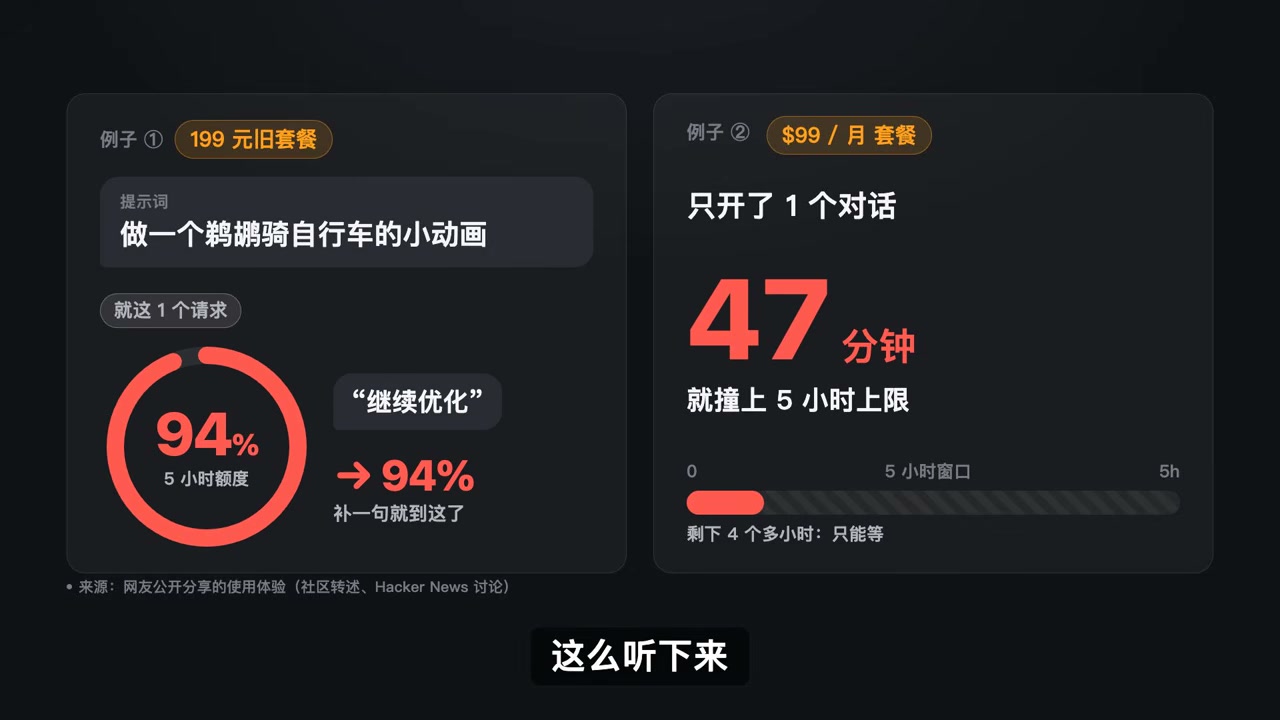
First, here’s the source of the controversy: two widely circulated usage records:
| Usage | Result |
|---|---|
| Legacy ¥199/month plan in China; prompted to “make a short animation of a goose riding a bicycle” | One request consumed 66% of the five-hour quota; adding “keep optimizing” pushed usage straight to 94% |
| Overseas $99/month plan; opened only one conversation | Hit the five-hour cap after 47 minutes, leaving more than four hours of nothing but waiting |
The common denominator was not “the model is slow,” but the fact that the quota is divided into time windows while the model is always thinking at full power. Kimi Code’s membership rules put it plainly: a rolling five-hour usage limit applies to every plan (new Plus and above plans have dropped the weekly limit, while legacy Andante and above plans retain it), and all membership features also share the same monthly quota pool.
Keep this mechanism in mind, because every figure that follows depends on it.
Separate the Two Bills: The API Is Not a Subscription
This is the point most people get wrong. Kimi’s API documentation is explicit: the API uses a pay-as-you-go model and is separate from its membership subscription plans. They are two different things.
- API: You pay only for the tokens you actually consume, with no time window, no hidden cap, and publicly listed rates.
- Subscription: You pay a fixed amount each month, and the platform grants you an allowance. The allowance is deducted based on usage, and using one feature to its limit affects the other features in the same quota pool.
The same model has a completely different cost structure depending on which route you take. Therefore, the question “Is Kimi K3.1 Pro expensive?” has to be split into two.
How Strong Is It Really? 65.7 Points, but Don’t Rush to Trust the Leaderboard
First, the basics: K3.1 Pro is a post-training upgrade of K3, with 2.8T total parameters, an MoE architecture, approximately 104B parameters activated per token, and a 1M-token context window. These figures come from Kimi’s official technical blog.
The official headline score came from Terminal-Bench 4.0 (official leaderboard), which requires the model to read files and issue commands in a terminal, completing a real task from start to finish:
| Model | Terminal-Bench 4.0 |
|---|---|
| Claude Opus 5.5 | 66.4 |
| Kimi K3.1 Pro (official) | 65.7 |
| Artificial Analysis retest | 67 |
| GPT-6 Astra | 58.2 |
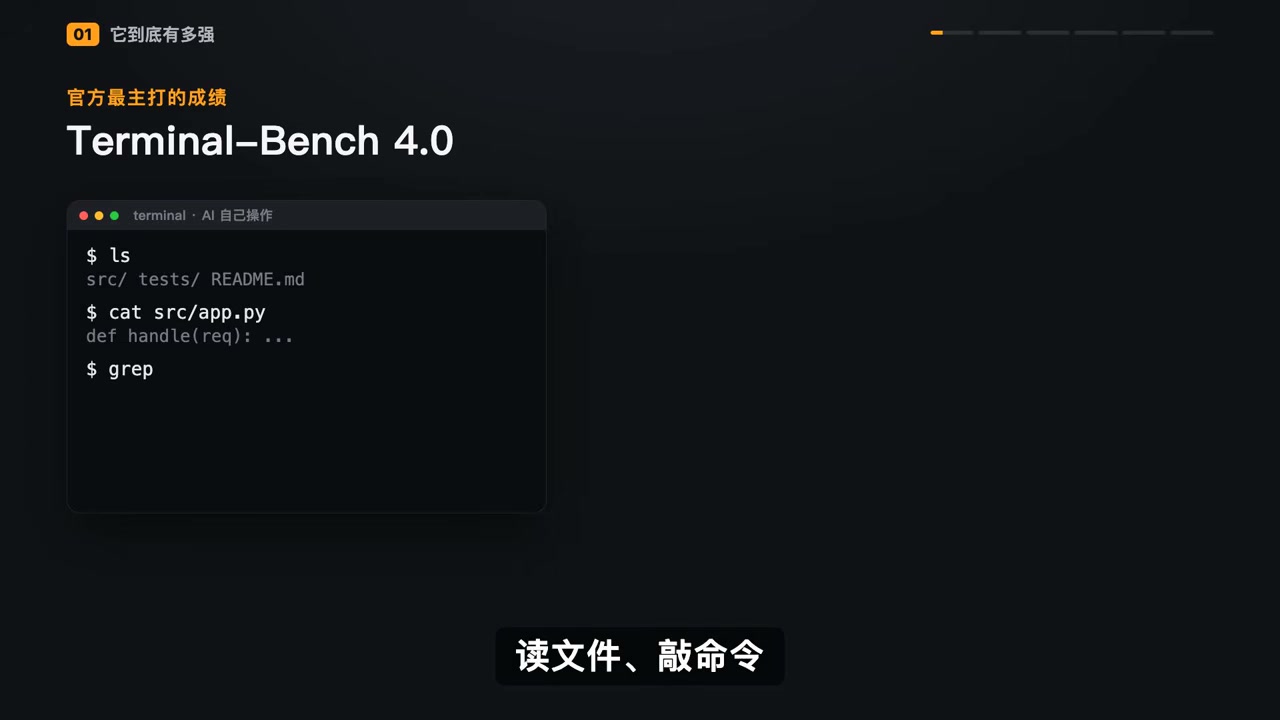
Why do two figures—65.7 and 67—appear for the same model? Because of the harness, the layer of tools and workflows wrapped around the model. Kimi’s self-test used Claude Code, while Artificial Analysis used its own evaluation framework, which the community jokingly calls the model’s “seat belt.” Swap the seat belts on the same car, and a one- or two-point difference is perfectly normal.
So your first reaction to a leaderboard should be: Who ran the test, and how did they run it? Not simply copying the score.

Benchmark Scores Are an Upper Bound, Not Your Result
Leaderboards have a well-known flaw: they test the best-case scenario.
One developer ran an experiment closer to everyday use: planting 105 vulnerabilities in two real codebases and asking the model to find and fix them on its own. K3.1 Pro fixed fewer of them than Claude Opus 5.5. Other developers have reported that, when used on their own projects, it likewise felt weaker than Opus and GPT-6 Astra. The sample size is too small to reach a firm conclusion, but it highlights one thing:
Benchmark results are only an upper bound, not the result you will actually get.
Another weakness that illustrates the point even more clearly: on Terminal-Bench Science 0.1, which covers scientific terminal tasks, K3.1 Pro scored only 38.1 points, while GPT-6 Astra scored 68.1. Its strengths lie in engineering implementation and long-horizon agentic work, not scientific reasoning.

The API Bill: Unit Prices Fell by a Third, but Your Bill May Not
First, here’s the pricing table (Kimi API pricing page, captured on 2026-10-24):
| Model | Input | Output | Cached Input | 5-Minute Writes | 1-Hour Writes |
|---|---|---|---|---|---|
kimi-k3.1-pro |
$2.00 / MTok | $10.00 / MTok | $0.20 | $2.00 | $4.00 |
kimi-k3.1-pro-highspeed |
$4.00 | $20.00 | $0.20 | $4.00 | $8.00 |
kimi-k3 |
$3.00 | $15.00 | $0.30 | $3.00 | $6.00 |
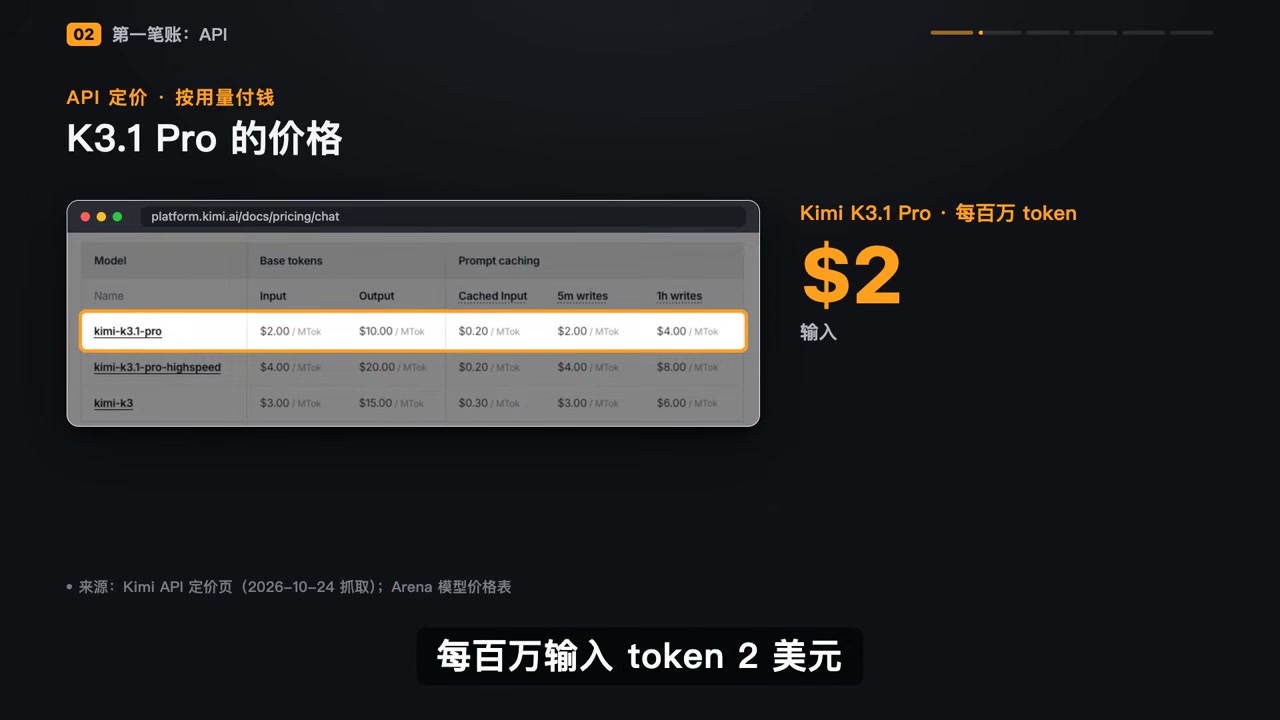
Compared with the previous generation, K3, K3.1 Pro cuts both input and output prices by one-third. It falls in the same price bracket as Opus 5.5 and GPT-6 Astra and costs roughly half as much as Opus 5.5. But a lower unit price ≠ a lower bill, because the bill is “unit price × token count,” and this model has one obvious flaw: it is verbose.
Artificial Analysis’s model page labels it directly:
- Across the full Intelligence Index suite, K3.1 Pro generated 150M tokens, compared with a median of 87M on the same leaderboard—roughly 70% more;
- AA directly labels it “very verbose” on the page;
- Compared with K3, it also produces 14% more output tokens per task.
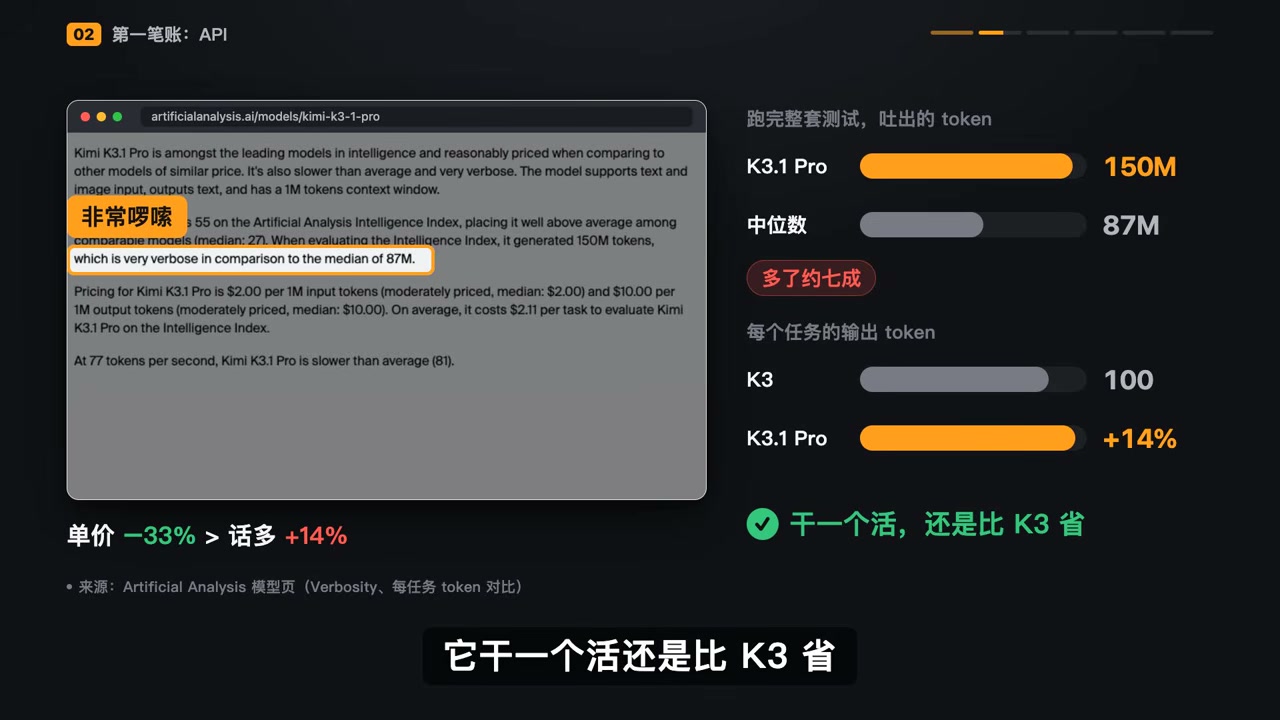
The good news is that the 33% unit-price reduction outweighs the 14% increase caused by the extra verbosity, so the cost per task is still lower than K3’s. In concrete numbers:
- Kimi’s official chart (Terminal-Bench 4.0): K3.1 Pro ≈$5/task, Claude Opus 5.5 ≈$14/task;
- Arena leaderboard (Kimi K3.1 Pro $1.23 vs. Claude Opus 5.5 $8.86): roughly one-seventh the cost.
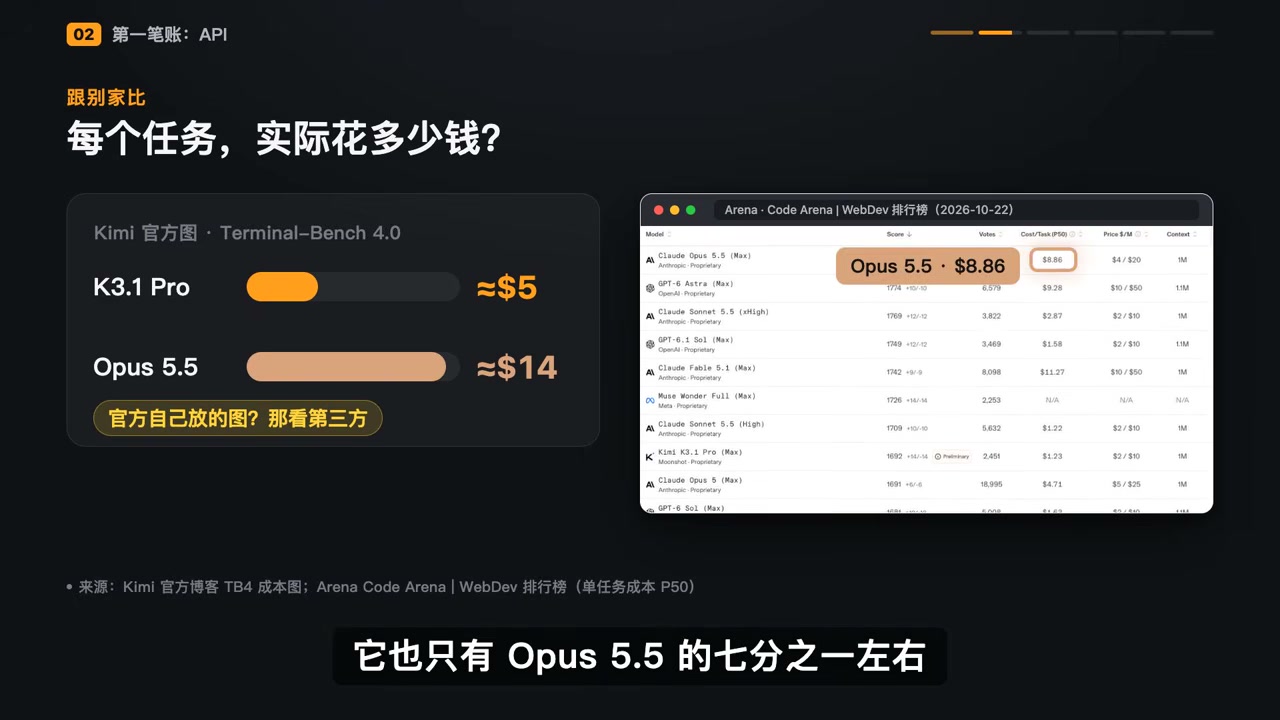
Judging by its API pricing, the model is priced in line with its capabilities.
The Subscription Bill: Maximum Reasoning by Default and Opaque Quotas
The subscription side works completely differently, with three core rules:
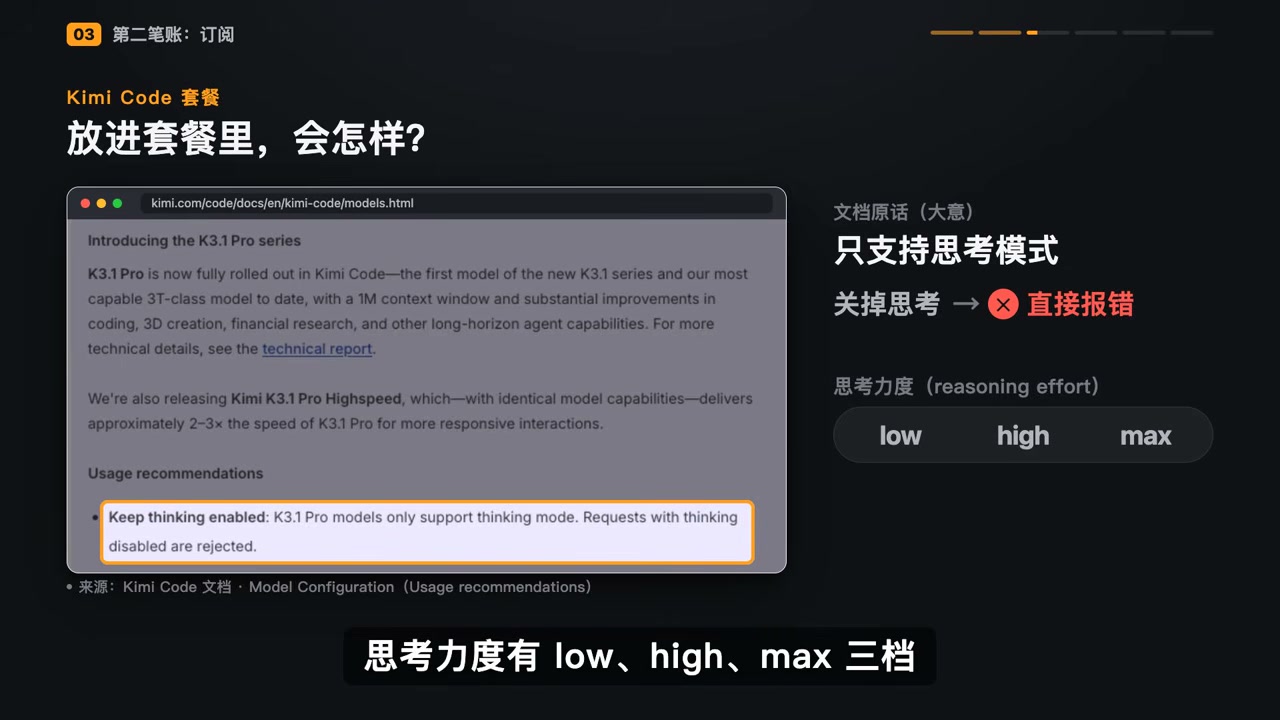
- K3.1 Pro requires thinking mode. Kimi Code’s documentation states: Keep thinking enabled — K3.1 Pro models only support thinking mode. Requests with thinking disabled are rejected. If you try to disable thinking, the request fails with an error.
- Reasoning effort has three settings:
low/high/max; if you omit it, the default ismax. - Thinking itself consumes tokens, and those tokens are deducted from your quota pool.
So what happens when you put an inherently verbose model that defaults to maximum reasoning effort into a plan with opaque quotas? Community reports offer a few data points:
| Plan Tier | Result |
|---|---|
| $39/month | A single test consumed 11.6% of the monthly quota |
| $19/month | After one task, the quota in the five-hour window was completely exhausted |
On launch day, developer Simon Willison ran his regular “signature test” as usual: asking the model to create an image of a goose riding a bicycle. He used the API and deliberately set the reasoning effort to low.

With the same prompt, subscriptions default to max, while the API lets you set low. One goose, two modes of thinking, two bills.
The all-you-can-eat buffet analogy is the most apt: the subscription is a buffet priced for a normal appetite; K3.1 Pro is the guest with an enormous appetite; the restaurant has limited capacity; and, in this restaurant, you are the one being rationed.
So the claims that it is “absurdly cheap” and “absurdly expensive” do not contradict each other—the people making them simply aren’t talking about the same thing.
Highspeed: Twice the Price for Only About a 20% Speedup
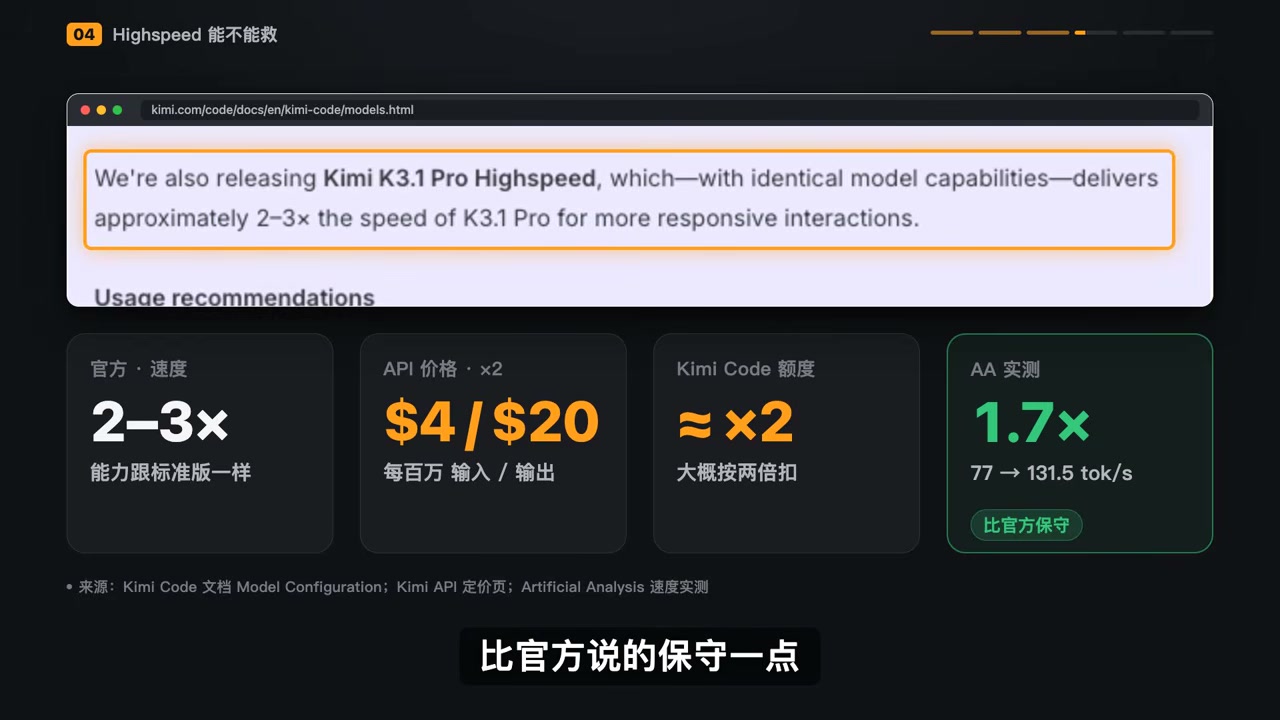
Highspeed’s official pitch is that it has exactly the same features as the standard version, runs 2–3× faster, and costs twice as much through the API ($4/$20). Usage in Cursor is also roughly twice as high.
In testing, the actual speedup was around 1.7×, a little more conservative than the official claim. But the real issue lies elsewhere, in a line from Cursor’s documentation: High-speed mode only accelerates model output; it does not affect tool calls or script execution.
AI coding is not just “typing.” It also involves reading files, running commands, and waiting for test results. One development team publicly shared a breakdown: typing was 3× faster, but the entire task was only about 20% faster.

It is like increasing a car’s engine speed threefold while every mile is packed with traffic lights; the total journey time will not drop to one-third.
What the high-speed version really buys you is the few seconds spent staring at the screen waiting for a response. If you are chatting back and forth or tweaking a page bit by bit, the improvement is noticeable. If you hand the task to the AI and go do something else, most of the extra money spent at twice the price is wasted waiting at traffic lights.
Three Model-Selection Questions
Question 1: Are You Using the API or a Subscription?
- If you use the API: It is exceptionally good value among models in the same tier. You pay for what you use, do not have to gamble on quotas, and can control
reasoning_effortyourself. - If you use a subscription: Buy one month rather than an annual plan. Run one of your most frequent tasks, see how much quota it consumes, and then decide whether to commit for the long term. Do not rush into an annual purchase just because the leaderboard numbers look good.
Question 2: Is the Task Worth All That Thinking Time?
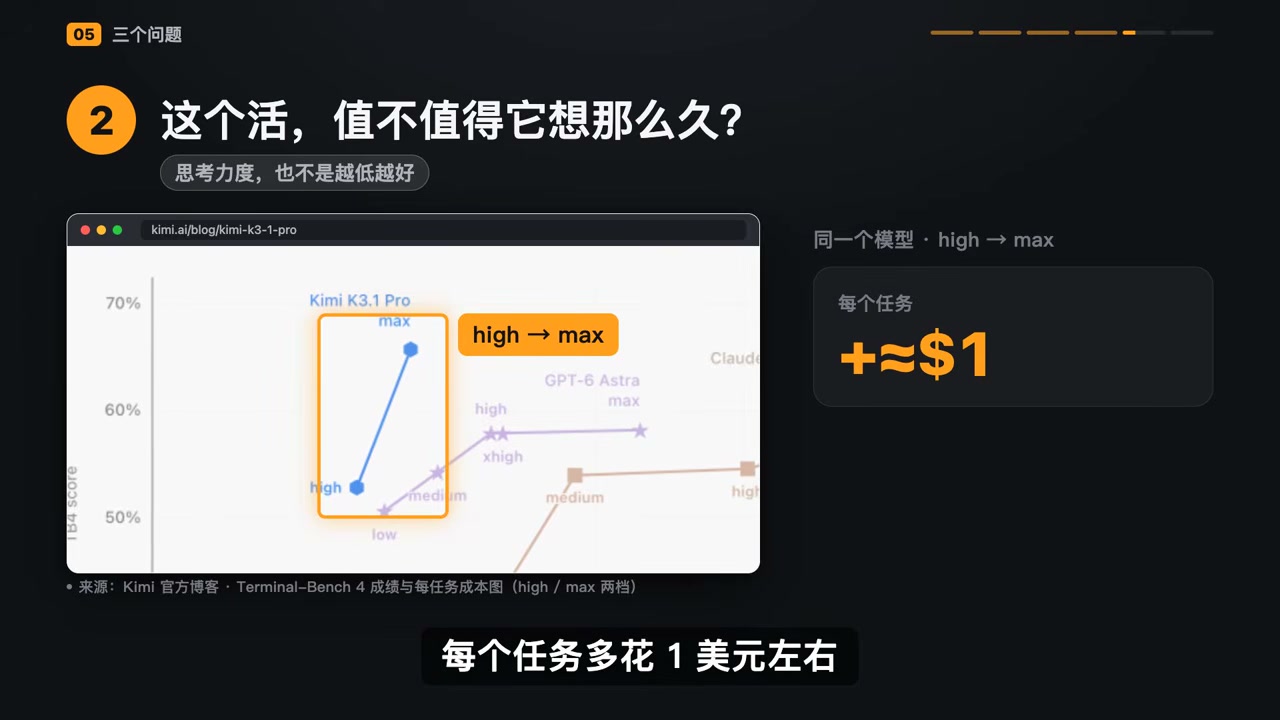
On Kimi’s official chart, moving K3.1 Pro from high to max adds about $1 per task and raises the score from roughly 53 to 65.7.
- For tricky agentic tasks—multi-step, cross-file, and requiring repeated self-checks—it is worth it.
- If you only want to change one line of text or ask about a concept, it is not worth it; you are simply burning tokens.
- Lower reasoning effort is not always better. On Kimi’s chart,
lowdrops to around 50 points, whilehighis the balance point for most use cases. - In Cursor, at least manually lower the reasoning effort instead of leaving it at max all the time.
Question 3: Is This the Kind of Task It Excels At?
Good at: Long, complex tasks that require self-reflection and repeated checking. In Kimi’s official example, a biomechanical model with 402 muscles was trained to walk. During the process, it found 36 errors in the shoulder torque-arm calculation on its own, eventually transforming the simulated character from one that “falls within seconds” into one that walks continuously for more than 11 seconds with an alternating gait.

Not good at: Medium-difficulty scientific tasks (38.1 vs. 68.1), or even basic multimodal common sense. Someone showed it an image and asked, “Have the people buried in the ground buckled their seat belts?” and it still got the answer wrong.
If all these tasks take the same amount of time, you are simply spending more money on a mediocre answer.
Weights Are Coming, but Don’t Even Think About Running It at Home
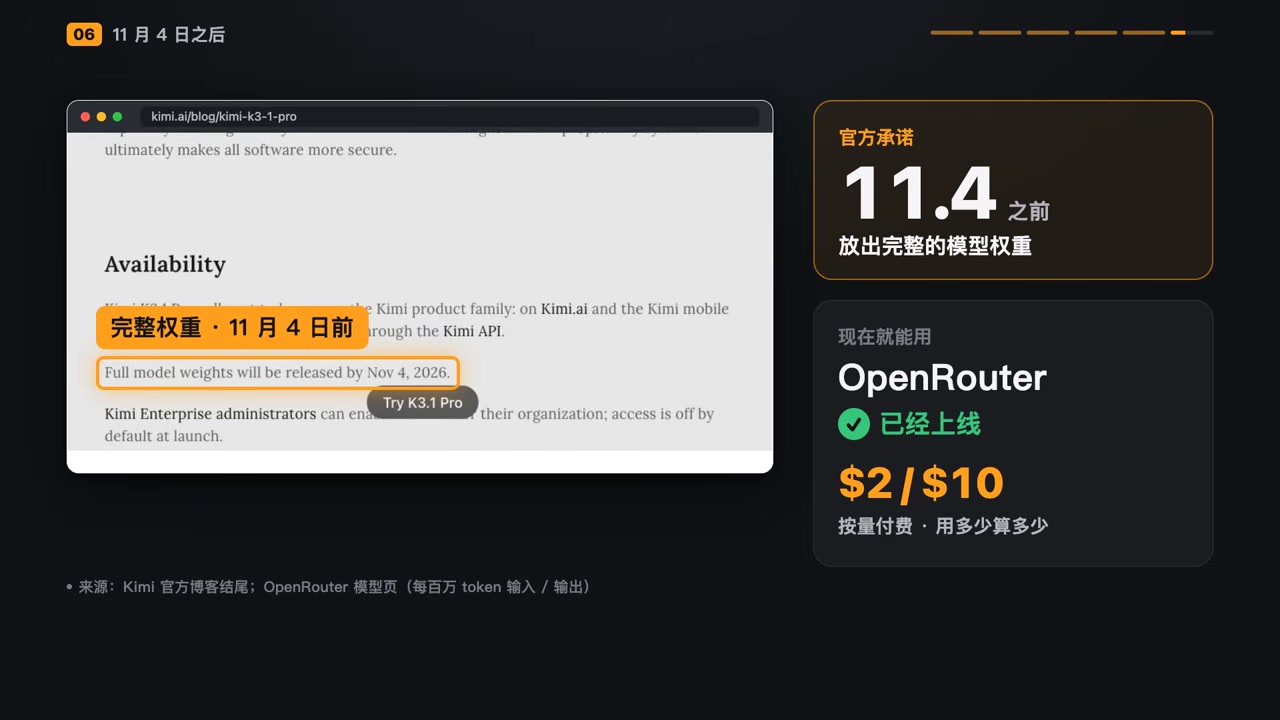
- The official team has promised to release the full weights before November 4;
- It is already available on OpenRouter with pay-as-you-go pricing of $2/$10, so you only pay for the portion you use;
- The advice to “use OpenRouter on demand instead of buying a Kimi subscription” therefore does hold up;
- But do not even think about running it at home: even quantized to 4-bit, the weights still total around 1.5TB. People have joked that you could spend $120,000 on hardware to run it locally at speeds as slow as Claude Sonnet 3.5. If you really want to run models locally, first use a one-command check to determine which model your computer is best suited for to narrow down the options—don’t jump straight to making the 1.5TB mistake.
Summary
Back when we evaluated a new model, we usually focused on just two numbers: the score and the price per million tokens.
Now, there is a third: how you plan to pay.
API or subscription? Is the task worth all that thinking time? Is this the kind of task the model excels at? Answer those three questions first, and only then look at the leaderboard score. Only at that point will those scores actually mean anything to you.
Returning to the quota-disappearing case from the beginning: it is not entirely the model’s fault. It is the result of putting a model with exceptional reasoning power into a plan that charges against hidden quotas and enables maximum reasoning effort by default.
If you are choosing a model, consider using a strong model for design and task decomposition while delegating the grunt work of code execution to a cheaper model—let the smart model think and the cheap model do the legwork. That is far more practical than obsessing over “which model is strongest.” For a more systematic comparison of different models, see How to Choose Between the Three GPT-6 Models. For a deeper look at task orchestration tools, the WorkBuddy tutorial provides a complete method for choosing models by task. If you are interested in local deployment of a 2.8T-class MoE, the AirLLM layered streaming approach is also worth reading.
Would you prefer pay-as-you-go API pricing or a subscription plan? Feel free to share your actual usage and any pitfalls in the comments.