
WorkBuddy Invite Code Registration Guide: DeepSeek Model Free for a Limited Time — All Credit Benefits Explained
If you haven’t signed up for WorkBuddy yet, this is a good window: the international version at workbuddy.ai carries my invite code P4SXWDDG in the link, and DeepSeek V4.1 Flash is currently a 0x credit multiplier — a limited-time free model that runs real tasks without burning through your credit balance.
Let me lay out the incentive upfront so you’re not reading in the dark: the invite code is embedded in the link. Sign up through this link and I get a share of the invite credits; on your end, you get the full new-user reward, and the DeepSeek free model is genuinely 0x credits. This is plainly a two-way deal, not a gotcha.
What follows is a clear breakdown of the credits you can claim, the registration steps, how to pick a free model, how to spend credits wisely, and when it’s actually worth paying. Every number here comes from the official documentation and hands-on testing in the client — not copy-pasted from marketing.
Invite code P4SXWDDG · 250 credits for new users · DeepSeek model at 0x credit multiplier for a limited time
1. What You Actually Get from Signing Up
Let’s start with the hard part: the numbers. Below are the values I verified in the client and on the official pricing page on October 22, 2026.
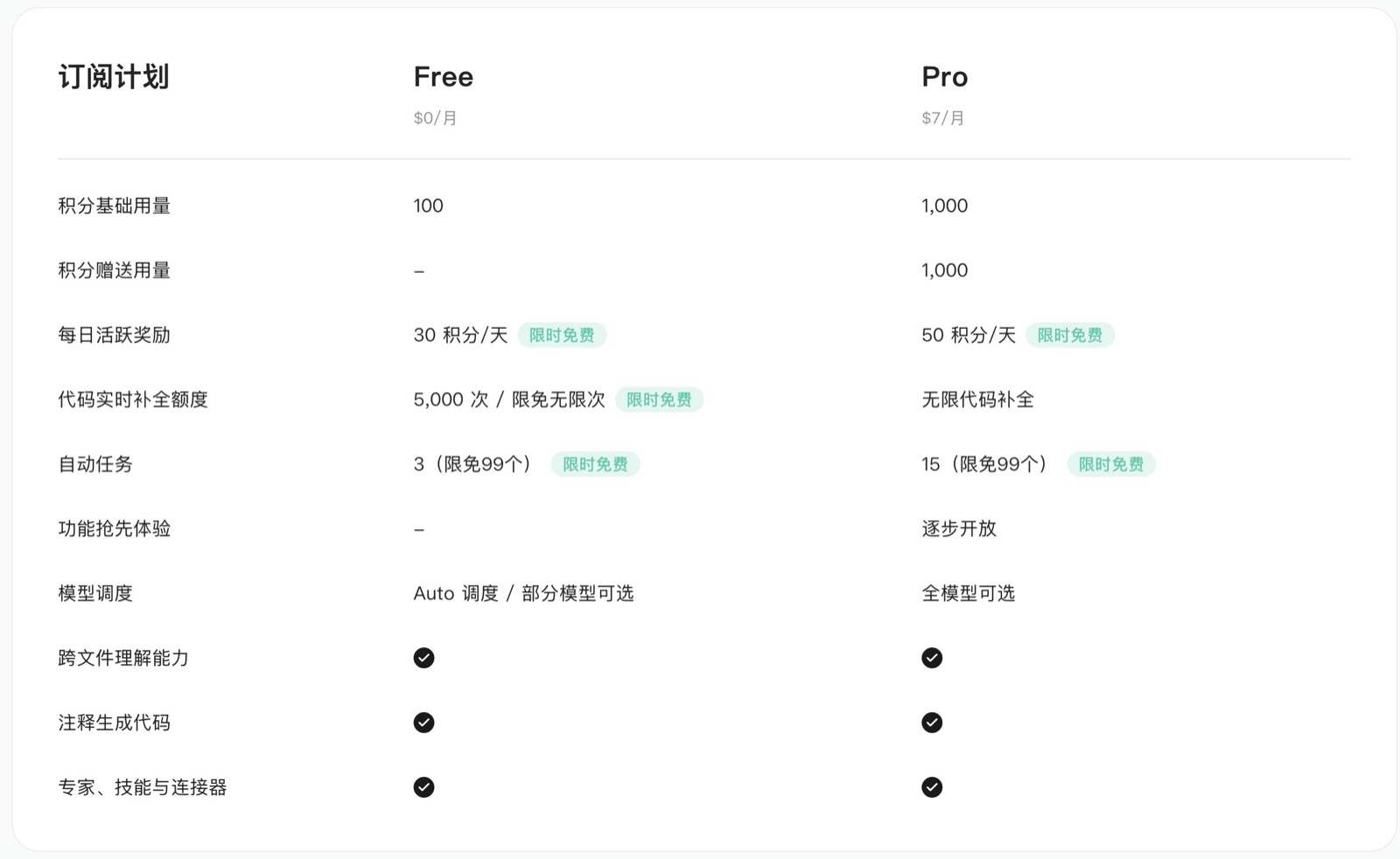
| Item | Free Tier Allowance | Notes |
|---|---|---|
| New user signup bonus | 250 credits | Auto-credited on first login, valid for 14 days |
| Monthly base allowance | 100 credits / month | Valid in the current month, no rollover |
| Daily activity reward | 30 credits / day | Limited-time event: complete at least one valid chat or task in the desktop client on a given day; credited the next day. Web version doesn’t count. |
| Deepseek-V4.1-Flash | 0.00x credit multiplier | Shows a “Free now” tag in the model selector; promo runs through October 31 |
| Hy3 | 0.00x credit multiplier | Also “Free now” — through October 31 |
| Step-5-Preview | 0.00x credit multiplier | Exclusive official partner promo, October 12–25 |
| Real-time code completion | 5,000 times / month | Unlimited during the promo period |
| Automated tasks | 3 | Expanded to 99 during the promo period |
About the invite code itself: since the changelog for international version 5.5.0, the official notes have explicitly listed the “Invite-a-friend credit rewards” channel — P4SXWDDG is just my entry into that program. Sign up through a link carrying the code parameter and your account gets tied to my invite tree; the exact amount credited to me depends on what you see in your account center (Profile → Usage). The official side hasn’t published a public doc on the precise reward structure, so I’m not going to make one up.
One thing worth flagging: everything labeled “limited time” above is a promotional perk the official side can change at any moment. The bottom of the pricing page literally reads: “Time-limited free benefits are not fixed entitlements; specific changes are subject to the official website and subsequent notices.” Don’t plan long-term workflows around these as if they were a permanent free tier.
2. Registration + Download: Four Steps to Get Going
Step 1: Open the invite link. The ?code=P4SXWDDG in the address bar is the invite code. Don’t strip the parameter manually — if you do, it degrades into a regular signup and the invite relationship disappears.
Step 2: Download the client. The international version provides macOS installers (dual build for Apple Silicon and Intel) and Windows x64 (also compatible with ARM64), plus iOS and Android mobile apps, and a web version you can use straight from the browser. The desktop client is recommended — I’ll explain why in a moment.
Step 3: Sign up and log in. Complete registration with an email or Google account and the 250 credits are auto-credited. You’ll see the details on the Usage page in your account center.
Step 4: Run a chat in the desktop client. A lot of people skip this: the 30-credit daily “activity” check requires at least one valid chat or task initiated in the WorkBuddy or CodeBuddy desktop client on that day. Chatting on the web doesn’t count, and the credits are only credited the following day.
3. How to Use the DeepSeek Free Models
This is the most valuable part of the signup. Create a new task in the client, open the model selector, and you’ll see the credit multiplier listed next to each model name:
| Model | Credit Multiplier | Notes |
|---|---|---|
| Deepseek-V4.1-Flash | 0.00x | “Free now” — promo through October 31 |
| Hy3 | 0.00x | “Free now” — promo through October 31 |
| Step-5-Preview | 0.00x | Exclusive limited free, ends October 25 |
| GPT-6-Luna | 0.07x | Budget paid tier |
| GLM-5.3-Flash | 0.08x | Budget paid tier |
| MiniMax-M3.1-Flash | 0.08x | Budget paid tier |
| Kimi-K3 | 1.62x | Premium tier — for long-form and deep reasoning |
| Primary | 3.31x | Premium tier |
| GPT-6-Astra | 6.67x | Most expensive tier — use sparingly |
A 0x multiplier means exactly what you’d think: tasks routed through this model don’t deduct credits. You don’t need to bring your own DeepSeek API key — just select it and go.
The official description of the event is “Free daily use with unlimited credits” — the daily free allowance is unlimited, but there’s no published cap on request count, so don’t treat it like a free API you can hammer indefinitely. The official side has also never committed to keeping it free beyond the promo period, so check the “Free now” tag in your client on the day you actually use it.
One more trap to watch out for: on the same machine, the China site (workbuddy.cn) and the international site (workbuddy.ai) are two completely separate account systems, model lists, and credit pools, and the invite code only applies to the international site. Mixing the two is a fast way to reach the wrong conclusions.
4. How to Spend Credits Without Wasting Them
Credit consumption is driven by three things: the model tier (more expensive = more credits), task complexity (simple Q&A < code generation < full-file refactor), and context length (longer conversations cost more). The deduction order is earliest-expiring first — when base, gifted, and top-up credits are mixed, the one closest to its expiration date is consumed first.
The free tier uses automatic model routing with the option to manually pick certain models; only Pro gets full manual selection and the ability to lock to a single model. So here are two practical strategies:
- Route heavy work through 0x models first. During its 0x window, Deepseek-V4.1-Flash can comfortably handle most document writing, research organization, code edits, and data tasks — saving your paid-model credits for what really matters.
- Save expensive models for tasks that genuinely need reasoning. Switch to Kimi-K3 or Primary for long-document refactors, multi-turn complex analysis, and similar. Otherwise, a week’s worth of free credits can vanish in two or three long conversations.
5. When It’s Worth Upgrading to Pro
If the free tier is enough, don’t rush to pay. Here’s the current personal pricing on the official page:
| Plan | Price | Monthly Credits |
|---|---|---|
| Free | $0 | 100 base + 30 daily activity |
| Pro (monthly) | $10 / month ($7 for new users’ first month) | 1,000 base + 1,000 gifted + 50 daily activity |
| Pro (yearly) | $96 / year (effectively $8 / month) | Same as above |
| Pro top-up pack | $15 / one-time, 500 credits | Valid for 1 month |
| Team | $40 / seat / month | 1,000 per seat, shared team pool + admin console |
A few easy-to-miss details: after you subscribe to Pro, the free tier’s standalone 100 credits no longer drop; monthly subscriptions are non-refundable, while yearly subscriptions can be refunded once within 7 calendar days as long as you haven’t used any credits (including base and gifted); top-up packs and redemption codes are non-refundable. Payment methods include credit cards, debit cards, WeChat Pay, and prepaid cards — users in mainland China don’t need to bind a foreign card.
My recommendation: run on the free tier for a week or two first, then decide based on your actual credit burn rate. For everyday document writing, organizing thoughts, and light data work, the 100 + 30×7 allowance plus the 0x models is honestly plenty. Once you find yourself relying on it as a primary production tool every day, or you need to lock to specific models, then go Pro. For billing, quota, or refund issues, the official support email is [email protected].
6. Six Things to Watch Out For
- Earn the daily 30 credits in the desktop client. Sending messages on the web doesn’t count as activity.
- Credits expire at the end of the month — no rollover. Gifted credits are valid for 1 month from issuance, so hoarding them is just letting them evaporate.
- The “Free now” tag can disappear. Glance at the model selector before you start a task; don’t schedule work based on old screenshots.
- Manually verify automated tasks first. For scheduled or unattended scenarios, run a few times manually to confirm the output is stable before flipping on automation.
- Leave permissions at their defaults. High-risk operations pause and wait for your confirmation — don’t loosen the rules before you’ve validated the workflow.
- Distinguish the China site from the international site. The invite code, accounts, credits, and model list are two completely separate systems; don’t cross-reference the international site with screenshots from the China site.
7. FAQ
Q: Do I need to bring my own DeepSeek API key?
No. WorkBuddy handles model routing itself — just select any model with the “Free now” tag and start using it.
Q: Can the free models be called unlimited times?
The official wording is “unlimited daily free credits,” but no request-count cap has been published. Don’t treat it as an unlimited API.
Q: Does the invite code still work for an account that’s already registered?
The invite relationship is usually bound at signup. Whether an existing account can be retroactively linked depends on what the client prompts; the official side hasn’t published a public rule.
Q: Is the free allowance enough for daily use?
For light use, yes: 100 monthly credits plus 30 daily credits, plus 0x free models. It’s not enough if you’re running heavy automation or batch processing.
Q: Which platforms and languages are supported?
macOS (Intel / Apple Silicon) and Windows x64 (compatible with ARM64) desktop clients, plus iOS, Android, and a web version. The UI supports Simplified Chinese, Traditional Chinese, English, and more.
Q: How do I confirm I received the credits?
After logging into the client, your account center (Profile → Usage) shows the balance and consumption history.
Wrap-Up
The reason this signup is worth doing is straightforward: a free credit allowance + 0x DeepSeek models + an entry point that doesn’t require your credit card. Sign up with invite code P4SXWDDG to get the 250-credit new-user bonus; I get a share of the invite credits on my end. Everyone walks away with something.
If you want to understand what WorkBuddy can actually do first, check out my earlier WorkBuddy Tutorial: Breaking Down the Logic of 8 Core Features — How AI Office Work Really Works — that one covers the feature logic; this one covers the cheapest way to get started. For multi-role collaboration patterns, see Multi-Agent Parallel: 5 Agents Collaborating on One Big Task. To compare other free-quota paths, take a look at MLH Hacktoberfest Free Cursor Pro Complete Claiming Guide.
Are you using WorkBuddy, Codex, or Claude Code right now? Drop a comment with your pick and the pitfalls you’ve hit. If this was useful, like and bookmark, and share it with a friend who’s looking for free AI office tools.
Registration entry: WorkBuddy International Site (invite code P4SXWDDG)
Official docs: Pricing and Allowance · Subscription and Event Rules