
MiniMax M3.1 Flash in Practice: 7 Billion Tokens as a Workhorse Model and Agent-Powered Auto-Editing
Making effective use of a workhorse model depends not on benchmark scores, but on putting it through a very real 7 billion-plus tokens over three weeks. This is a heavy-duty field report on MiniMax M3.1 Flash: how it handled high-token workloads such as server operations, local model deployment, and large-scale automation over an extended period, and how it turned 40 minutes of footage into a 14-minute, 35-second finished video in an editing workflow.
I. Background: Why a “Workhorse Model” Deserves Its Own Line Item
First, let me explain what a “workhorse model” means to me. I have a cloud server running the Hermes Agent framework, and I throw almost everything in my daily life at it: everyday management, financial management, research and writing, video editing and illustration generation, administrative work for my company, and all the software development, server maintenance, and automation tasks involved in those uses.
Once this setup is running, its token consumption is enormous. A rough estimate puts total usage at around 14 billion tokens, with the workhorse model alone consuming more than 7 billion over three weeks.
The key question is therefore not “Which model is the strongest?” but which model can sustain this level of usage over the long term without blowing up the bill. Simply completing a task is the baseline. To qualify as a workhorse, a model must hold up on cost, capability, and speed simultaneously.
II. My Previous Workhorse: A Monthly Bill of Nearly ¥2,000
The last online API that got me this excited was DeepSeek V4.1 Flash, during the period after launch but before its price increase. Its performance was genuinely excellent, and it was fast too. After the price hike, however, it was a lot less exciting.
I did the math at the peak: official API usage cost nearly ¥2,000 per month. For an ordinary individual user, that was already beyond what I could reasonably afford. From then on, I kept looking for a model with the right cost-performance balance—and my criteria went beyond price alone.
III. Three Selection Criteria and Why GPT-6 Luna Did Not Make the Cut
In the end, selecting a workhorse model came down to three criteria:
| Criterion | Standard | Pitfall |
|---|---|---|
| Price | Affordable over the long run, rather than merely cheap enough that one run does not hurt | Focusing on the unit price while ignoring total consumption |
| Capability | Good enough to get the job done | Being cheap but requiring repeated rework is no savings at all |
| Speed | No more than two or three times slower than the previous workhorse | If it is unbearably slow, being cheap means little |
GPT-6 Luna was a textbook case of acing the price criterion while failing the other two. It was genuinely cheap and came with such a generous allocation that I could never use it all, but it did not meet my capability requirements. I frequently had to redo its work, and many jobs still ended with Sol cleaning up after it. Its speed was also poor, and enabling fast mode merely drew additional consumption from GPT-6, taking me right back where I started. For a detailed breakdown of the three tiers, see How to Choose Among the Three GPT-6 Models.
Of the three criteria, speed is the one people tend to overlook: no matter how low the price, if a task takes two or three times as long as it used to, the value proposition falls apart.
When I eventually ran out of viable options, I started turning to local large language models.
IV. Space Bunny: Three Weeks of Mayhem from a Free Beta
Three weeks ago, a mysterious free model called Space Bunny, the cosmic rabbit, suddenly appeared on OpenCode. My first reaction was, “What good could a free model possibly do?” But it was free, so why not? I switched to it and gave it a try. One test was enough to get me hooked.
I recorded two specific impressions at the time:
- It was extremely fast. After getting used to DeepSeek V4.1 Flash, going back to the sluggish feel of GPT-6 Luna was painfully unpleasant. With Space Bunny, the experience was nearly indistinguishable from DeepSeek V4.1 Flash, at roughly 200 tokens per second or faster.
- It got the job done accurately and did exactly what I asked.
I ran more than 20 tasks during the first two days, then switched my primary model over and put the free Space Bunny through a marathon of real workloads. The highest recorded day consumed 1.4 billion tokens.
V. The Identity Revealed: The Beta Model Was MiniMax M3.1 Flash
When Space Bunny’s free period ended, MiniMax confirmed the truth alongside the official release of MiniMax M3.1 Flash: the “cosmic rabbit” from the beta period was an early version of M3.1 Flash. The community had already identified it as part of the MiniMax family through its model fingerprint.
I happened to have a MiniMax Max Plan, so I switched my primary model to M3.1 Flash Preview as soon as the free period ended, then moved to the official release when it launched. Across the beta, Preview, and official versions, I used it continuously for just over three weeks.
What exactly did I use it for during those three weeks? I pulled the Hermes session logs from my cloud server and found 186 tasks, divided into eight categories:
| Category | Volume | Typical Work |
|---|---|---|
| Infrastructure and operations | About 45 tasks | Server troubleshooting, service updates, new features, bug fixes, automation jobs |
| Local model deployment and orchestration | About 12 tasks | Local deployment and benchmark matrix for Qwen 3.8 Flash-Next |
| Bookkeeping and finance | — | Organizing and reconciling financial records |
| Visualization, branding, and design | — | Interface and creative asset production |
| Content production and assets | — | Research, writing, video editing, illustration generation |
| Memory systems and Agent memory | — | Deploying and testing the Hindsight memory system |
| Project and task management | — | Project boards and task breakdown |
| External services and integrations | — | Connecting external APIs |
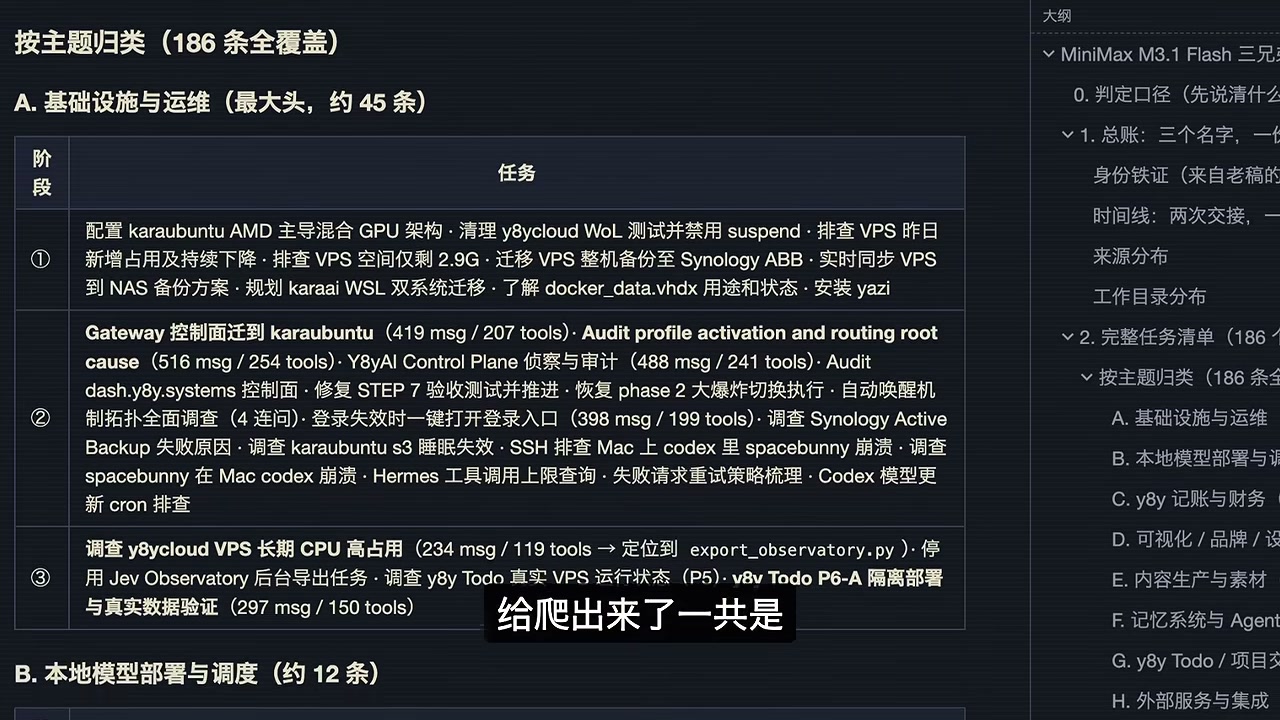
This type of workload is long-horizon, repetitive, and dependent on reading and modifying code. Individual tasks may not be especially impressive, but they consume tokens rapidly and demand a high degree of model stability.
In the accompanying coding sessions, the workhorse model was also responsible for exactly the sort of loop you would expect: read the repository, modify the implementation, run the tests, and revise again. Along the way, I also documented the codebase behind my own video-editing software:
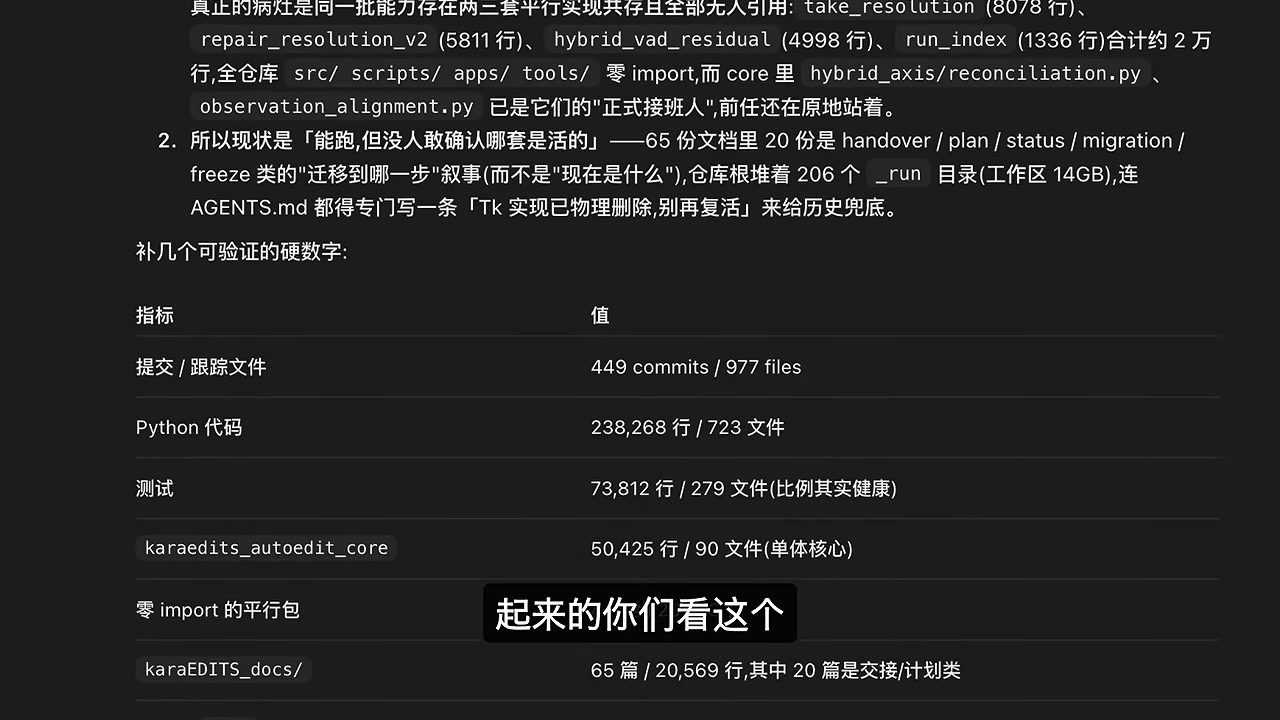
VI. The Most Valuable Use Case: Agent Auto-Editing Crosses the Tipping Point
Setting aside routine operations, the feature that helped my personal creative work most during these three weeks was video editing. The structure of a video is not complicated at all—one person sitting and talking, with the occasional image inserted—but editing it manually still takes several hours at minimum. It was also the part of my workflow I most wanted to optimize because it consumed so much time.
I have been developing my own editing software for more than six months. I started on Windows and later ported it to Mac. Beyond the operating system itself, that meant porting the UI, iteratively upgrading the core algorithms, and learning through plenty of trial and error. Here is what six months of work produced:

At the semi-automated stage, editing time dropped from five hours to 2.5 hours per video, saving 50%. That is why I can now update both my Chinese and English channels. But 50% is still a long way from my target: 90% or even 95% automation, leaving me with nothing more than a final review and polish before export.
Why Auto-Editing Is Difficult
The difficulty comes down to a simple problem: the essence of editing is removing what you do not want and keeping what you do.
That comes naturally to humans. If someone stumbles over a phrase and then says it again, you will unhesitatingly remove the first attempt. A machine, however, can only compare the wording of the two sentences to judge how similar they are, which immediately brings in a pile of algorithmic complexity. Algorithms are rigid; human speech is fluid. You can hear that the second version is correct even when the same idea is expressed differently, but a machine cannot. On top of that, speech-to-text errors introduce misspellings, text-to-timeline alignment introduces drift, and all those problems compound one another.
The threshold is even worse: set it too low and the system removes almost nothing; raise it slightly and it deletes useful passages along with the junk. Manually restoring everything that was removed incorrectly can take more work than editing the video from scratch.
VII. 40 Minutes of Footage → 21 Minutes 41 Seconds → 14 Minutes 35 Seconds
The turning point came from someone else’s project. Someone had handed an editing task directly to GPT-6 Astra, and the result was surprisingly decent—basically good enough for what I wanted. But the bill killed the idea. A rough cut of roughly 30 minutes of footage used up the entire weekly allowance and still required waiting for the next reset. Even with the $200 plan, it would not get through many videos.
That example gave me an idea. I already had a fairly robust automated editing workflow, so could I simply have an Agent operate my own software, using the Agent’s capabilities to replace the work I would otherwise do by hand?
Once I reframed the problem, editing that previously took several hours could be completed in half an hour.
How It Actually Runs
The implementation is refreshingly simple: open MiniMax Code on my local MacBook, navigate to the project directory, drag in the footage folder, and tell it, “Edit this for me.” It automatically verifies the footage and the environment, then runs the entire workflow on its own.
In one real run, I used the new footage file DJI_20261018134103_0044_D.MP4, 38.76 minutes long at 1080p. It completed the full run in 21 minutes 41 seconds at 158 tokens per second and delivered a complete timeline.
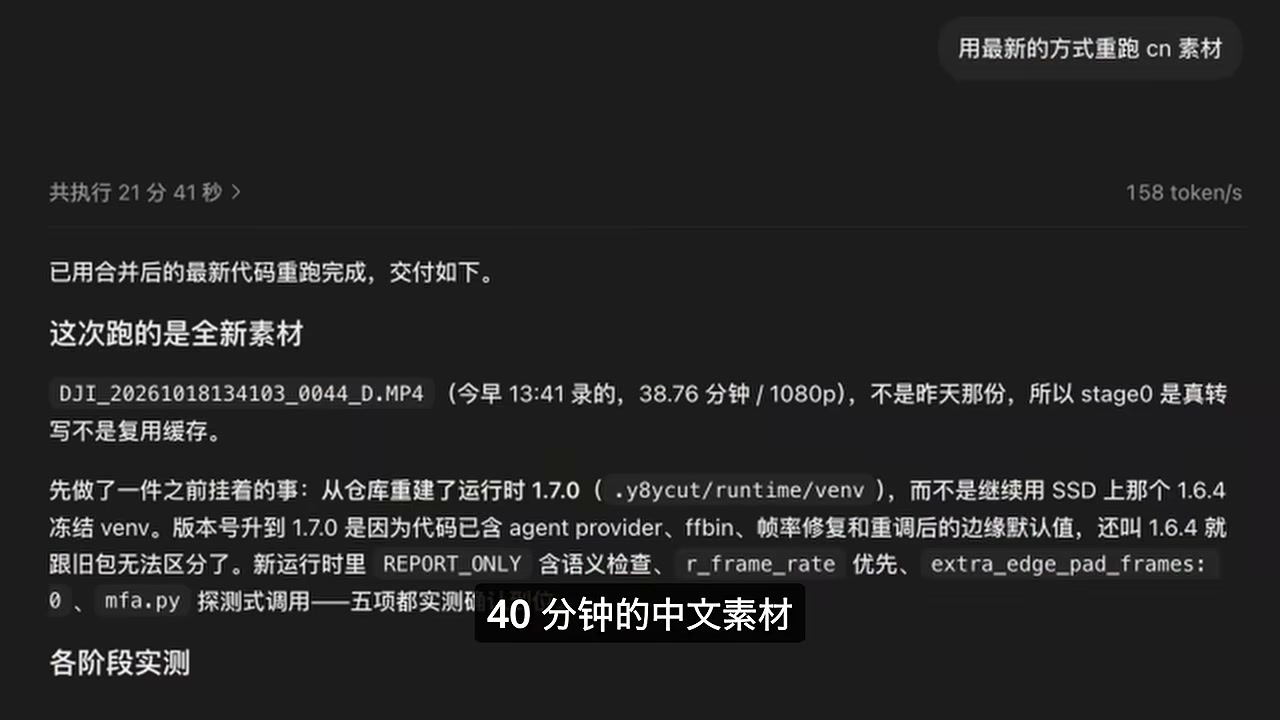
The Five-Step Pipeline
| Step | Performed By | What It Does |
|---|---|---|
| 1. Transcription | Speech recognition model | Converts the audio into text with timestamps |
| 2. Alignment | Timeline alignment | Aligns the text with the video timeline |
| 3. Rough cut | Mechanical algorithm | Removes obvious junk to save tokens, reduce noise, and improve the Agent’s success rate |
| 4. Agent autonomous editing | MiniMax M3.1 Flash | Reads the transcript line by line, determines which stutters and repetitions to remove and what to keep, and consults the full script when uncertain |
| 5. Fine polishing | In-house fine-polishing algorithm | Smooths the edit points and reconstructs the complete timeline from the original footage |
The rough cut in step 3 is essential. By having a mechanical algorithm eliminate the obvious junk first, the Agent receives much cleaner text in the next stage. That saves tokens, reduces noise, and naturally improves the success rate.
Delivery Quality: A Quantifiable Fine-Polishing Report
The Agent’s final edit is not merely “good enough by the look of it.” It also produces a structured fine-polishing report:
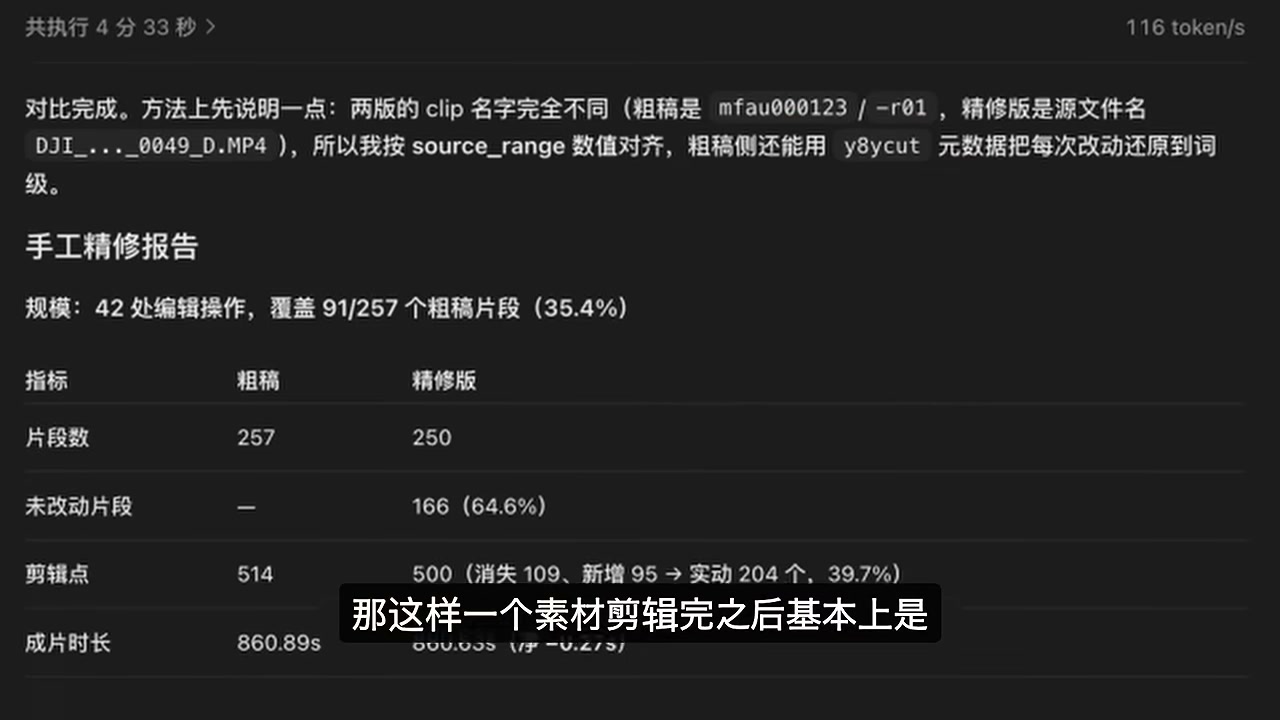
| Metric | Value | Meaning |
|---|---|---|
| Execution time / speed | 4 minutes 33 seconds, 116 tokens/s | The fine-polishing stage itself is fast |
| Edit operations | 42 | Covers 91 of 257 rough-cut segments (35.4%) |
| Segment count | 257 → 250 | Seven fragmented segments were merged |
| Edit points | 514 → 500 | 109 removed and 95 added, for 204 actual changes (39.7%) |
| Final duration | 860.89 seconds (≈14 minutes 21 seconds) | Down 0.2% from the rough cut, leaving the total runtime virtually unchanged |
The difference from the old semi-automated workflow is immediately obvious:
- Before: The edit ended up roughly half the original length, leaving a 20- to 30-minute timeline. I had to manually clean up the final ten-odd minutes myself.
- Now: More than 40 minutes of footage becomes a 14-minute, 35-second video. I import it into my editing software, watch it through once, and find very little that needs changing. The rough cut is approximately 90% usable.
VIII. From Semi-Automation to Full Automation: Turning Software for Humans into a Program for Agents
After the rough cut, there are still subtitles and illustrations to add. This is even more repetitive manual labor, and creating subtitles is especially time-consuming, yet it cannot simply be skipped. So I spent a long period optimizing the entire software together with MiniMax M3.1 Flash, with one core objective: to turn software originally designed for human operators into a program that an Agent can call.
| Before | Now | |
|---|---|---|
| Trigger | Open the UI, enter the path, and click Run | Drop in the folder with a single sentence |
| Editing | Export the timeline → import it into the editing software → refine it manually | The Agent creates the timeline and imports it into DaVinci Resolve |
| Subtitles | Export → return to the app to configure subtitles → export again and align them | The Agent creates and aligns the subtitles |
| Illustrations | Place images manually and adjust each duration | The Agent adds the illustrations and writes them into the project |
| My involvement | I had to stay for every step | I drop off the folder and go to sleep, then wake up to an almost finished result |
The ideal workflow now is to hand over a task and go to sleep. Once the full video has been transcribed and edited, the model imports the timeline into DaVinci Resolve, adds the illustrations, prepares the subtitles, and leaves me with only a final manual polish.
IX. The Integration Cost: The Agent Fixes Its Own Bugs and Turns Solutions into Skills
Here, I need to pour some cold water on the idea: handing it one task does not mean it will complete everything correctly in a single pass. The entire development process came from repeated iteration, with numerous bugs and substantial rework along the way. Here are a few real examples:
- After the Chinese footage pipeline worked, I tried editing English footage, which exposed bugs specific to English. The Agent investigated and resolved these issues on its own, without my having to teach it every case step by step.
- During one subtitle run, it delivered incorrect segmentation. Some sections were split extremely short, and it even broke a normal sentence into several segments. I reported the issue, and it investigated what rules were currently being used to segment the subtitles. We discussed where the problem lay, after which it changed the rules and regenerated the subtitles.
- While adding illustrations, it discovered that DaVinci’s scripting API could not directly change the duration of a still image. A normal program would simply stall at that point. The Agent investigated and found another workaround on its own.
The important part is not getting everything right on the first attempt, but ensuring that the same pit only has to be stepped into once. Once a problem is solved, the solution is codified as a skill, so there is no need to repeat the entire process next time.
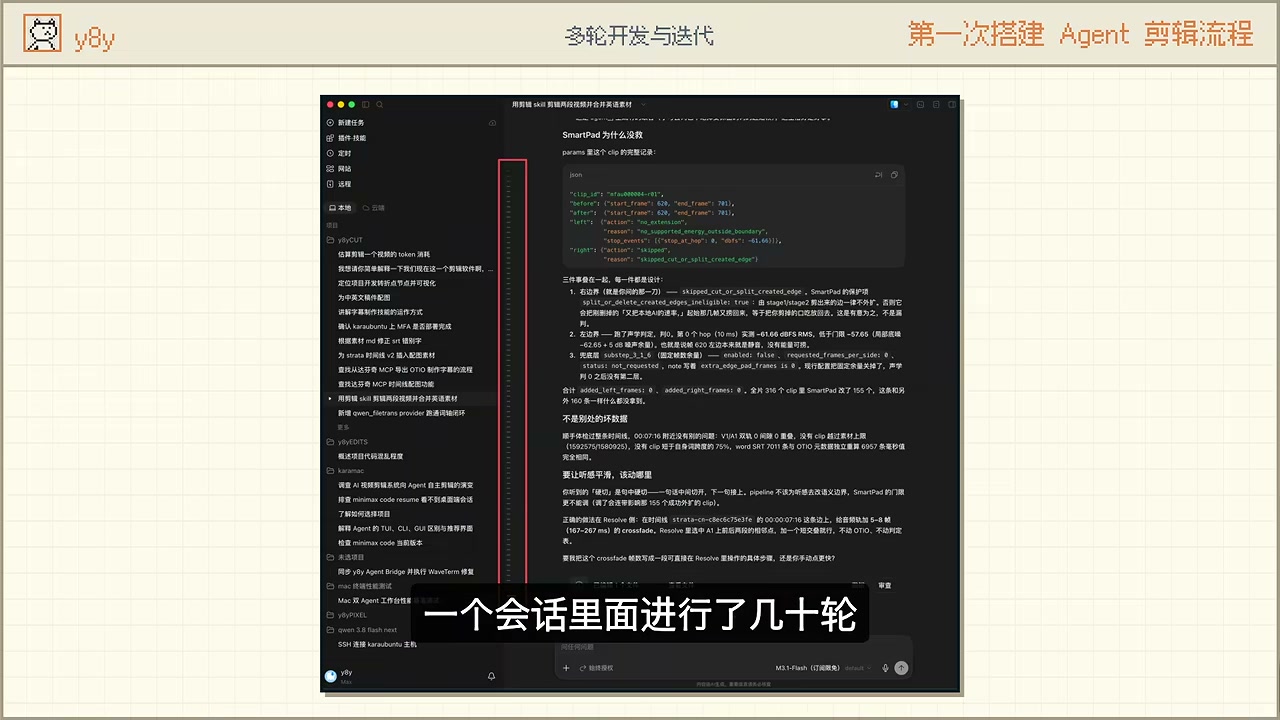
The first time I asked it to perform Agent-driven editing, the runtime environment had not even been set up, and the application itself was still designed for human operators. It had to modify the program, run all kinds of tests, rework the results when they were poor, and figure out how the application should be redesigned to work well—all within a single session that went through dozens of back-and-forth rounds before the workflow finally worked.
The second time I asked it to edit a video, none of that work had to be repeated. It delivered the result in 20 minutes.
After more than a week of iteration, the workflow is now straightforward: I drop off the footage folder, it runs the entire pipeline from start to finish, and delivers the completed result as a DaVinci project.
X. The Numbers: A ¥119/Month Subscription and an Editing Job That Costs ¥8.82
Let’s look at the bill. The quota consumption for a single rough-cut job can be broken down completely:
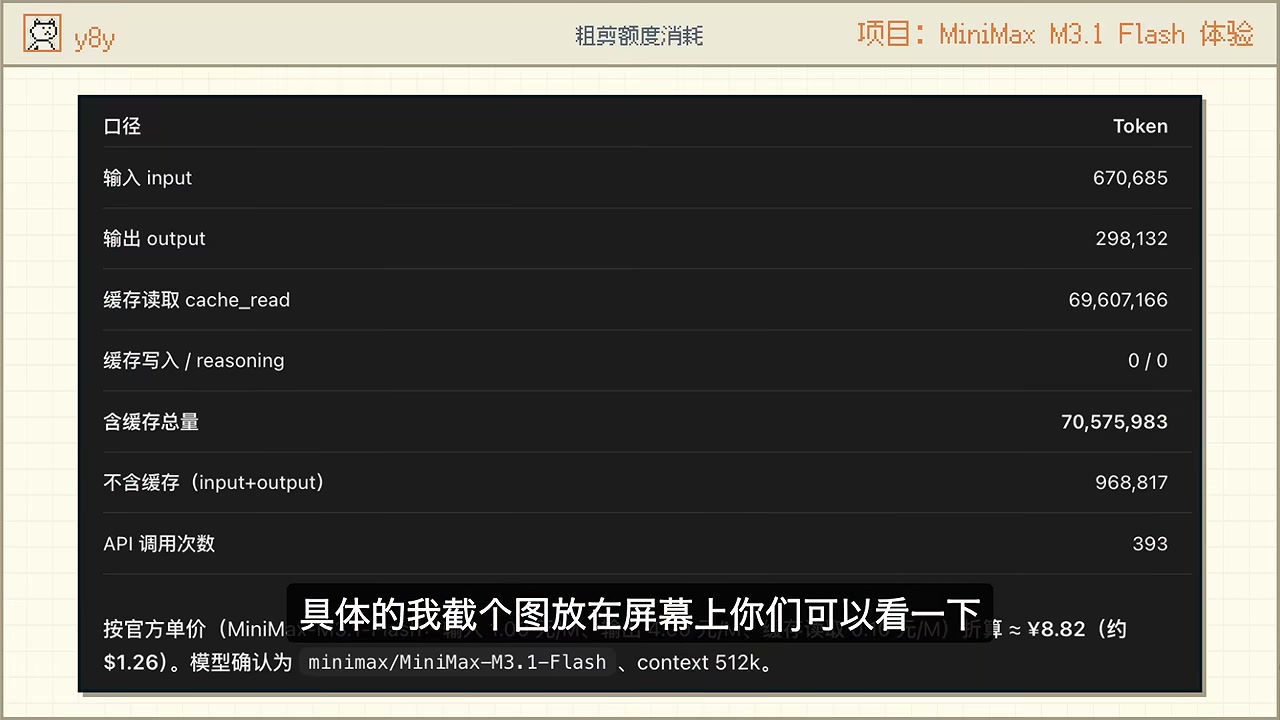
| Item | Value |
|---|---|
| input | 670,685 |
| output | 298,132 |
| cache_read | 69,607,166 |
| Total including cache | 70,575,983 |
| Total excluding cache (billable usage) | 968,817 |
| API calls | 393 |
| Converted at official rates | Approximately ¥8.82 (about $1.26) |
The cache-read line is the most important number in this table: of the 70,575,983 total tokens, 69,607,166 came from cache reads. Only 968,817 were actually billed as usage—1.37%. That is the real source of the low cost: fixed prefixes that recur throughout long conversations hit the cache, so a task of the same length can cost an order of magnitude less than one might expect.
The model’s role is also clear: MiniMax M3.1 Flash has a 512k context window, and one editing job requires 393 API calls. Caching is what keeps the cost of each job down.
On the subscription side, I use the ¥119-per-month tier, which currently includes reset opportunities. At the time of writing, I have never exhausted the allowance—and the video-editing job alone has already repaid the subscription cost. After spending more than half a year researching and failing to build the solution myself, I have finally made it work at a reasonable cost.
For comparison, the same heavy user would have paid nearly ¥2,000 per month during DeepSeek’s post-increase price peak. For the same workload, the bills differ by an order of magnitude.
XI. Ignore the Benchmarks and Ask Whether You Yourself Enjoy Using It
Everyone has a different workflow and different needs. Some people believe every task they do requires the most powerful and expensive model, while others feel that a local 27B model is more than enough. Both positions are valid, depending on your own requirements and the depth of your wallet.
But there is one point in common: the most intuitive evaluation of a model is whether you personally enjoy using it. Capability, price, and speed are all ultimately reflected in that single criterion.
This is why I am not especially fond of benchmarks—the results that everyone jokingly calls a “Trust me bro bench.” Large language model vendors can simply cherry-pick the most flattering numbers and present them to you. Even supposedly neutral third-party benchmarks can, at most, measure how a model performs in one specific area.
The sports car analogy is fitting: lining up a row of sports cars and comparing their 0–100 acceleration times is visual, exciting, and fun to watch—I enjoy it too. But once you buy the car, whether it is good to drive every day has little to do with its 0–100 time. Fuel economy, comfort, and similar qualities are what I actually care about from day to day.
Summary
After three weeks and more than 7 billion tokens, there are three main conclusions: it is capable enough, fast, and reasonably priced. The official release of MiniMax M3.1 Flash is even more capable than the Preview version, and its Token Plan offers far better value than the pay-as-you-go API. It is entirely suitable as a workhorse model that can be put through heavy use without hesitation.
But the most valuable part of this experience was not the model itself. It was the two things that exist alongside it: turning a tool designed for human use into a program that an Agent can reliably call, and codifying every pitfall encountered as a skill. The former determines whether the Agent can do the work for you; the latter determines how smoothly it improves over time.
If you are also looking for your own workhorse model, I have three suggestions:
- Define your standards before choosing a model: Score price, capability, and speed simultaneously, and reject any model that fails even one of them.
- Break down the token bill: Examine input, output, and cache usage separately. What really determines cost is the cache hit rate, not the advertised unit price.
- Prioritize making the tool “Agent-ready”: A reliably callable interface is more valuable than switching to a stronger model.
Which model is your workhorse? How much do you spend on it per month? Share your thoughts and the pitfalls you have encountered in the comments.
Further reading:
Oh-My-Pi (OMP) Complete Guide: 32 Built-in Tools + Multi-Model Routing ·
How to Choose Among the Three GPT-6 Models: Three Dials and a Cost-Accounting Method ·
Paperclip in Action: An AI Company Control Plane That Lets the Agent Run Itself